

The source of this tool is available at GitHub.
Use this tool to help you migrate your existing yFiles application a new version.
The migration-tool will work best on strict TypeScript. For frontend frameworks, it is best to keep the script-code separate from HTML templates.
Caution
In order for the migration tool to work, you have to have the version of yFiles for HTML installed into your project that you want to migrate from. That is, when migrating from 2.6, yFiles 2.6 needs to be installed.
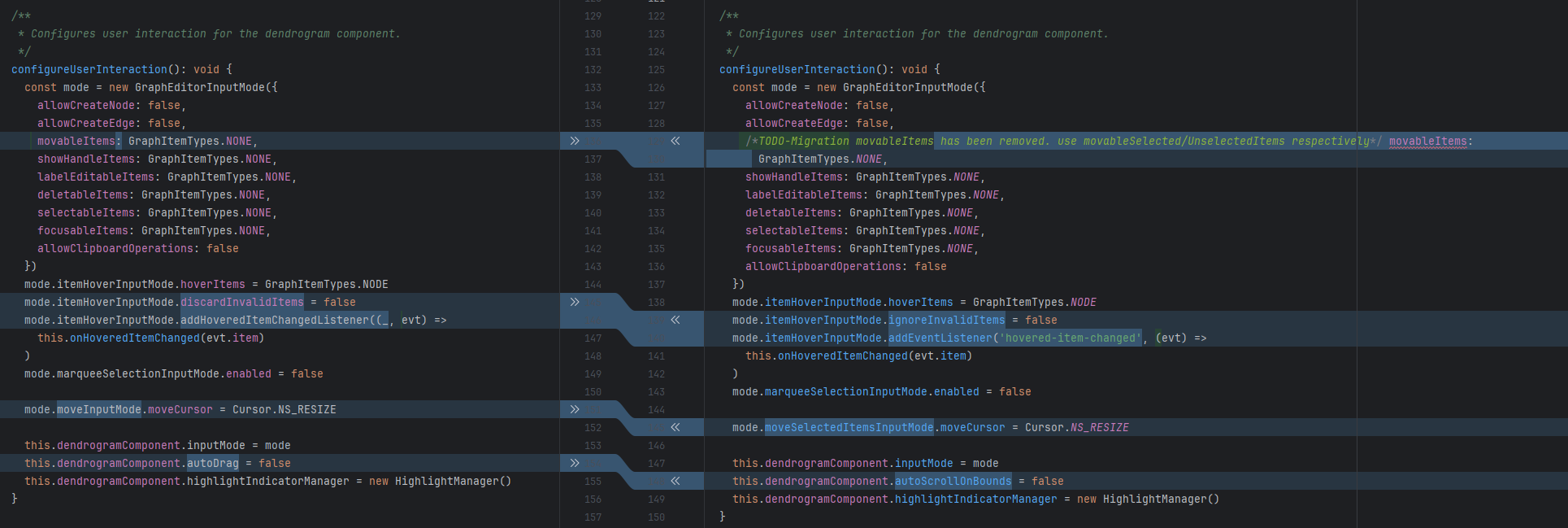
In general, the tool will either perform automatic migration or add a migration comment that can include helpful information to ease more complex migration operations. As shown above, the automatic migrations range in complexity from simple renames to more complex signature changes.
Caution
This tool will manipulate the files in place, make sure that you have no uncommitted changes and/or a backup
Important
This version supports migration from version 2.6 onward. For migrations from versions earlier than 2.6, please refer to the previous GitHub releases.
Point the migration-tool to the tsconfig of your project
npx @yworks/migrate-yfiles-app@latest --configPath=<path_to_tsconfig>
or alternatively to a folder containing the files you want to migrate
npx @yworks/migrate-yfiles-app@latest --folderPath=<path_to_migratable_files>
When migrating from e.g., 3.0 to 3.1, use the
--from="3.0"
flag.
To enable the migration of Vue components, use the
--vue
flag.
yFiles is the industry-leading software library for visualizing, editing and analyzing graphs.
yWorks GmbH, Vor dem Kreuzberg 28, 72070 Tuebingen, Germany