| Documentation · Quick start · Models · API | |
|---|---|
| Project |    |
| Status |    |
Time series serving for foundation models. TServe loads models such as Chronos, TimesFM, Moirai, TTM, and TiRex once, keeps them in memory, and answers forecast requests over HTTP.
Each model family ships its own package, input format, and loading code. sktime wraps them as forecasters with one common interface, and TServe runs those forecasters as a server behind a single request: a table of past values and a horizon. Trying another model means changing one field, not rewriting your pipeline.
- Over 100 checkpoints. Each family has its own Docker tag or pip extra, for CPU or GPU. Catalog · Capabilities
- Loaded once, kept warm. Weights download and load at startup, so each request pays only for inference.
- JSON from anywhere.
POST /predictworks from curl or any language. Send a prediction - Native tables in Python. The
Clienttakes a dict, pandas, polars, or pyarrow table and returns predictions in the same type. - A dashboard in the browser.
GET /plots a forecast from a sample series or your own CSV. What you can do - Your own sktime models. Serve a configured forecaster, a saved
.zip, or a craft spec next to the catalog models.
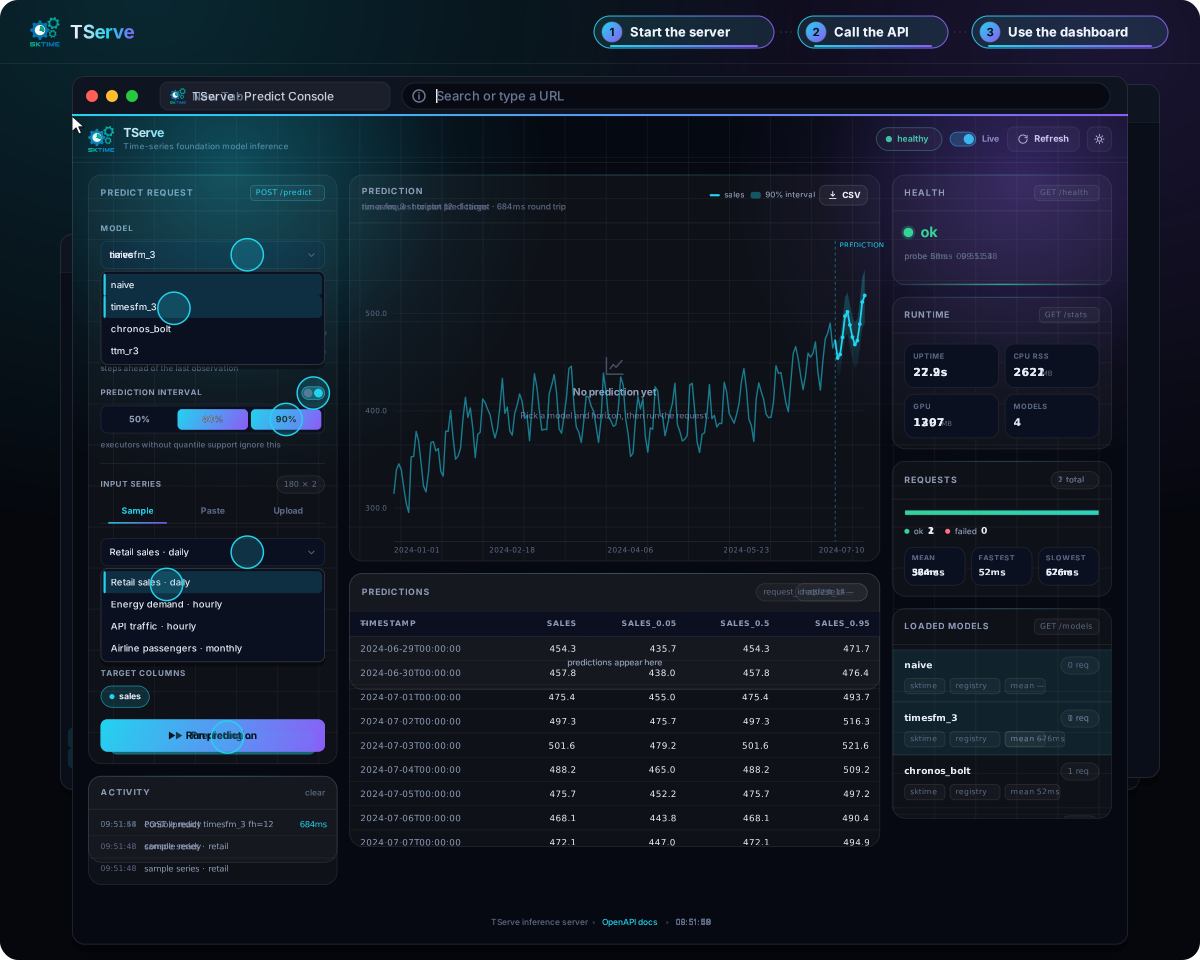
TServe is a server you run on your own hardware, not a hosted API. How it works · Docker Hub
Docker is the short path. This image can load Chronos Bolt, Chronos T5, TTM, and TimesFM 2.x. The first start downloads the weights you name.
docker run --rm -p 8000:8000 sktime/tserve:hub chronos_bolt ttm_r3When the log prints the local URLs, the models are warm. Five days of sales, three steps ahead:
curl -s http://127.0.0.1:8000/predict -H "Content-Type: application/json" -d '{
  "past": {
    "timestamp": ["2024-01-01", "2024-01-02", "2024-01-03", "2024-01-04", "2024-01-05"],
    "sales": [120, 135, 128, 142, 138]
  },
  "fh": 3,
  "model": "chronos_bolt"
}'
{
"predictions": {
"timestamp": ["2024-01-06T00:00:00", "2024-01-07T00:00:00", "2024-01-08T00:00:00"],
"sales": [139.96, 138.93, 138.26]
},
"quantiles": null,
"model": "chronos_bolt",
"request_id": "…"
}Open http://127.0.0.1:8000/, pick chronos_bolt, and plot the same series. The page can also take a pasted or dropped CSV. What you can do
The same call from Python. The client posts Arrow, and predictions comes back as the same kind of table you sent:
pip install "tserve[client]"from tserve.client import Client
past = {
"timestamp": ["2024-01-01", "2024-01-02", "2024-01-03", "2024-01-04", "2024-01-05"],
"sales": [120, 135, 128, 142, 138],
}
with Client("http://127.0.0.1:8000") as client:
result = client.predict(past=past, fh=3, model="chronos_bolt")
print(result.predictions)The walkthrough, including GET /models and PowerShell: Quick start. A GPU host adds --gpus all and uses sktime/tserve:hub-gpu. GPU images
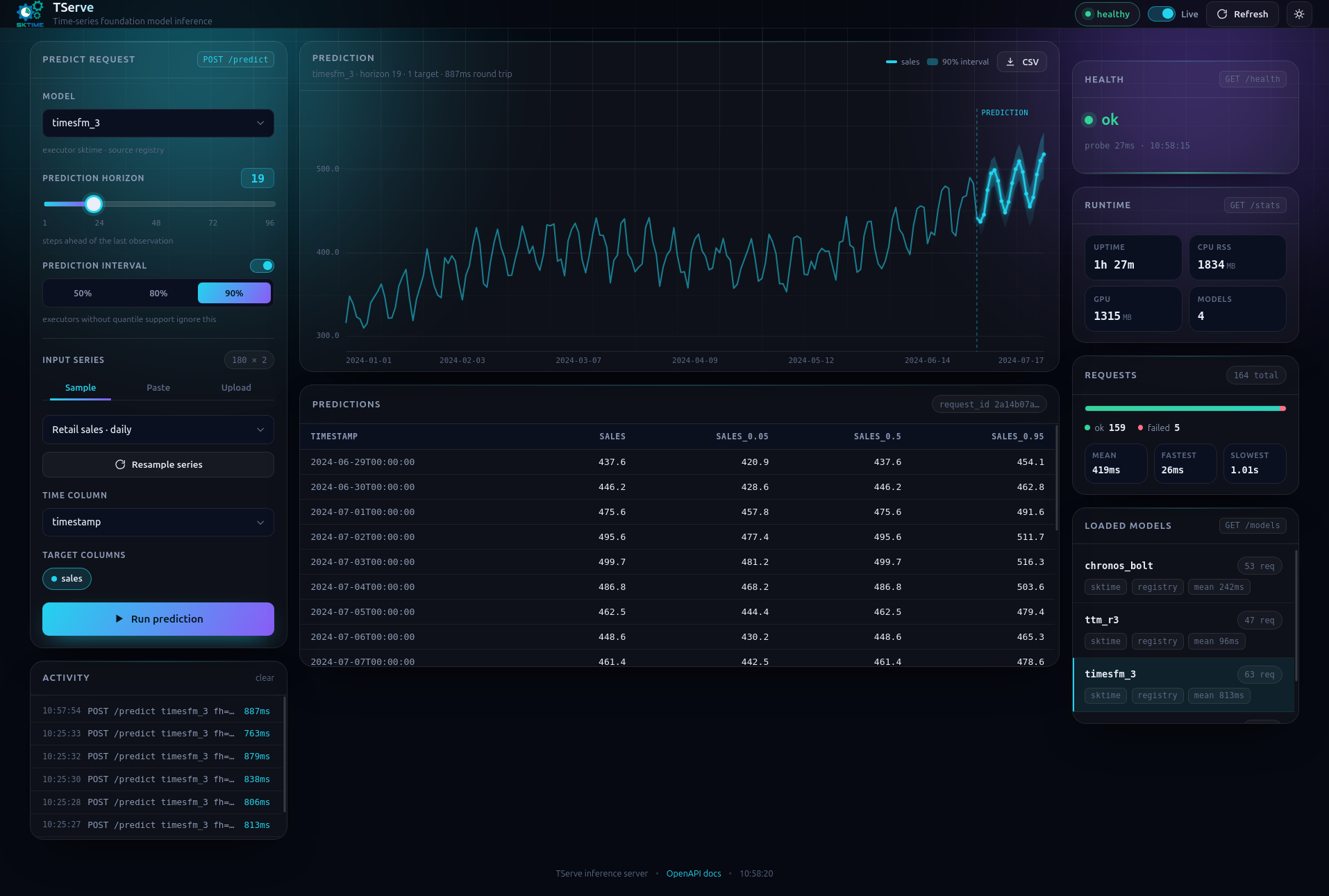
The running server serves a browser console at GET /. The model list is whatever this process loaded. You set a horizon, optionally a prediction interval, and a series (a built-in sample, pasted CSV, or a dropped file, parsed in the browser), then the page posts POST /predict and plots the result. Health and runtime stats sit on the right. What you can do
Below, timesfm_3 forecasts retail sales with 90% prediction interval.
117 checkpoints. The extra name is the image tag, sktime/tserve:<tag>, and server publishes as :base. GPU tags append -gpu. base has no GPU tag. added counts checkpoints that extra contributes. full is the total, including naive.
naive always loads, so you can try the process before any download. GET /models lists what this process loaded, which is smaller than the catalog. What gets loaded
| extra | families | added | example |
|---|---|---|---|
server |
Naive | 1 | naive |
hub |
Chronos Bolt, Chronos T5, TTM, TimesFM 2.x | 81 | chronos_bolt |
chronos |
Chronos-2 | 3 | chronos_2 |
kronos |
Kronos, WindFM | 5 | kronos |
granite |
FlowState | 2 | flowstate |
moirai |
Moirai 2, Moirai 1.x, Lag-Llama | 8 | moirai_2 |
tirex |
TiRex | 2 | tirex |
tirex2 |
TiRex-2 | 4 | tirex_2 |
toto |
Toto-2 | 5 | toto_2_0_4m |
mantis |
Mantis | 3 | mantis_8m |
timesfm3 |
TimesFM 3 | 1 | timesfm_3 |
t0 |
T0 | 1 | t0 |
tafsut |
Tafsut | 1 | tafsut |
full |
all of the above | 117 | chronos_2 |
kronos is built on base. Chronos Bolt, TTM, and TimesFM 2.x load on the images that include hub: chronos, granite, moirai, tirex, tirex2, toto, mantis, timesfm3, t0, tafsut, and full. TimesFM 3, TiRex-2, T0, and Tafsut load on their own extras and on full. Tags, GPU variants, and how the extras stack: Dependencies.
Each family page has its own start command. The catalog collects them under Start a server. Switching images is the tag plus the example from that row:
docker run --rm -p 8000:8000 sktime/tserve:moirai moirai_2Multivariate series, covariates, and quantiles differ by family: Capabilities. Every checkpoint name: All models. mantis needs more than 127 rows of past: mantis.
Docker needs no local Python. uv and pip need Python 3.12 or newer. Install the extra, or pull the tag, for the family in the table above.
- Docker. Pull an image, then run the server. CPU and GPU are separate tags.
- uv or pip. UV / Pip. A PyPI install takes CUDA torch (MPS on macOS). A CPU wheel: CPU-only install.
- A clone. From source. On a clone, uv selects the torch index with the
gpuextra.
A bare tserve loads naive only. Name the models you want beside it. Flags are --host, --port, and --log-level: Flags · Startup and exit.
- On the command line. Start · Serve from the command line
- From Python.
Serverloads models before the port is bound. The same entry point from code: Python entry point. - In Docker, with a token and a weight cache. Hugging Face token · Keep weights between runs · Choose which models to load
- An estimator you already built. Pass
(id, estimator). Predict requests use that id asmodel. Live objects · Configured Hub estimators - A craft spec. A class call with constructor kwargs and no imports. On the CLI it is
id=spec. From the command line · Rules - A saved sktime
.zip. Save a model · Load them · in Docker: Models from a directory
Startup prints the dashboard, Swagger, and ReDoc. What you can do · Live OpenAPI
JSON goes to POST /predict. The Python client posts Arrow to POST /predict/bytes. Both send the same fields. Request fields
past is one row per timestamp, fh is how many steps ahead, and the forecast continues from the last row. Omit time and the first column is time. Omit target and the other columns are the series, except any you also put in future. Column roles · Column inference · Prediction horizon and model
| you want | read |
|---|---|
| JSON from any language | Send a prediction · Endpoints |
| Row-oriented JSON, or Arrow | Use row-oriented JSON · Arrow endpoint · Table formats |
| pandas, polars, or pyarrow | Use native tables · Connect |
A pandas DatetimeIndex |
Use an indexed pandas frame · Time |
| Covariates or a static row | Future and static data · Request covariates |
| Quantiles | Quantiles · HTTP · Python |
| The response shape | Response |
| Health, loaded models, latency | Inspect the server · Status routes |
A body the schema rejects is 422. An unloaded model or a missing column is 400. Predict requests · Python client errors · Startup
Which families can take more than one target, a covariate, or a quantile: Capabilities. Panel and hierarchical input are outside this contract. Validation and limits
The generated reference for the same surface: HTTP API · POST /predict · Python API.
BSD 3-Clause. See LICENSE.
License covers only the model server, not the models themselves or distributions pathways such as Hugging Face. Third party model weights, model code, or distribution pathways may create their own implications via licenses or T&C. While we try to make it easy for users to gain a transparent picture of legal implications, we do not assume any liability or guarantee correctness of metadata related to third party licenses or T&C.
Development setup, checks, tests, and image builds: Development · Checks · Tests · Docker images.