
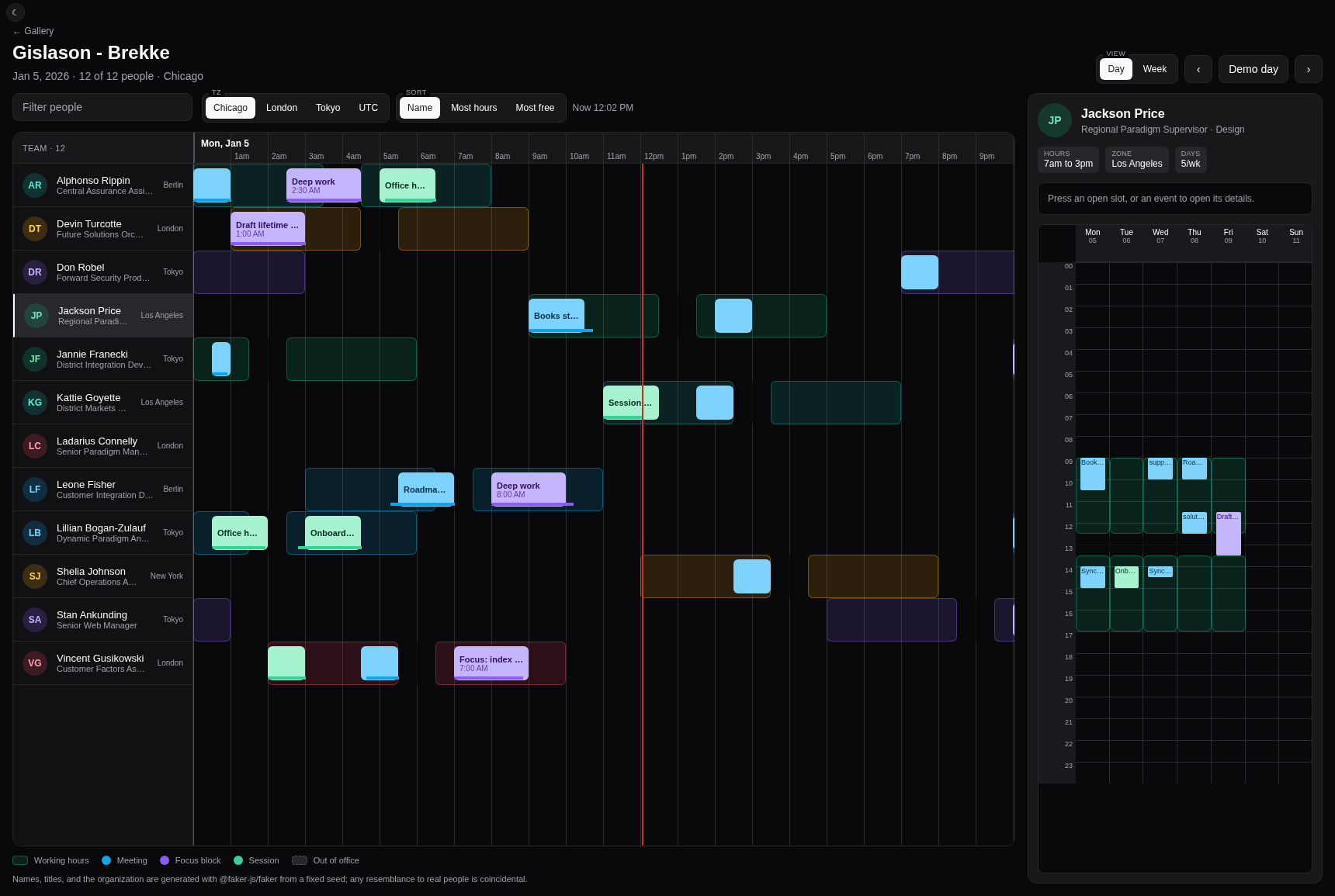






"Why is nobody on Wednesday?" Rosters and schedules for React Native and web. Press the empty Wednesday and it names the dentist appointment that emptied it.
<Roster
  lanes={lanes}
  windowSpec={windowSpec}
  onGapPress={(rect) => console.log(rect.sources)} // [{ kind: 'date', id: 'dentist' }]
/>
A staffing screen gets asked who is on right now, who is free at 3, and why
nobody is on Wednesday. The third question needs the rule behind the rectangle,
so every interval and gap keeps its sources. Press an interval to get the sources
that produced it; press a gap to get the sources that removed it.
The showcase derives gap presentation from the complete source set: its authored lunch rules are
partial, its authored PTO dates are whole-day, and unknown, absent, or mixed sources stay neutral.
Width only controls whether the source-derived label is visible in either projection.
Generated showcase events apply an authored wall-time policy: skipped starts are omitted, repeated
starts and ends use the earlier occurrence, and skipped ends clamp to the first instant after the
skipped span. Empty or negative results are omitted. This policy is local to the showcase.
In the showcase toolbar, Day and Week name the spans, while Demo day and Demo week reset
their respective windows. Compact dates use month names, and a range crossing New Year names both
years. Week mode also offers Detailed and Fitted: Detailed keeps a scrollable 42-pixel-per-hour
axis whose time ticks repeat compact date context after each day boundary's bare first neighbor.
Fitted uses the measured plot width and the week's actual elapsed duration, including 167-hour and
169-hour DST weeks. Day mode keeps its fixed axis. These are showcase choices, not additional
Roster props or fitting behavior.
Give each person or resource a lane. Roster draws every lane on one time axis;
Schedule draws any one of them as a week, days across and hours down. The same
lane feeds both.
Roster draws elapsed time, so the week the clocks change is 167 or 169 hours
wide; Schedule hatches the hour they skipped.
It does not create, drag, or resize anything, and it has no month grid; if you need those, reach for react-native-calendar-kit or react-native-big-calendar.
Browse every example in the gallery.
These steps assume an Expo app.
-
Add the package and LegendList:
bun add react-native-roster @legendapp/list
-
Add Reanimated for your Expo SDK:
bunx expo install react-native-reanimated --bun
-
For web, add React DOM, React Native Web, and Radix Popover; every web build needs all three:
bunx expo install react-dom react-native-web --bun
bun add '@radix-ui/react-popover@^1.1.23'
Without Expo, follow the Reanimated install guide
for 3.19 or newer. On React Native older than 0.79, turn on
resolver.unstable_enablePackageExports in Metro.
The workspace demo routes the root, /core, /rrule, and /nativewind imports through each
export's react-native condition on web, iOS, and Android. Metro therefore compiles TypeScript
source edits without rebuilding dist; the resolver still uses the package export map rather than
an alias, and leaves peer and unrelated-package resolution unchanged. Restart the demo server if a
source edit is not detected.
The smallest useful roster: Alex works 09:00 to 17:00 UTC on Monday, and a table
row says so. Roster fills its parent by default; here it gets a fixed height.
import { Roster } from 'react-native-roster';
import type { Lane } from 'react-native-roster/core';

const lane: Lane = {
  id: 'alex',
  label: 'Alex',
  layers: [
    {
      id: 'working-hours',
      role: 'availability',
      z: 0,
      style: { color: '#4f9478' },
      intervals: [
        {
          start: Date.UTC(2026, 8, 21, 9),
          end: Date.UTC(2026, 8, 21, 17),
          sources: [{ kind: 'table', id: 'alex-monday' }],
        },
      ],
    },
  ],
};

export function RosterExample() {
  return (
    <Roster
      lanes={[lane]}
      style={{ height: 480, flex: undefined }}
      windowSpec={{ span: 'day', anchorDate: '2026-09-21', timezone: 'UTC' }}
      onIntervalPress={(rect, pressedLane) => {
        console.log(pressedLane.label, rect.sources); // Alex [{ kind: 'table', id: 'alex-monday' }]
      }}
    />
  );
}
Add lanes for more people. Add layers and they stack by z. Roster lanes and Schedule columns
mount the same internal layer stack, so interval and gap ordering, highlighting, and slot behavior
match in both projections.
Hand Schedule that same lane and it draws days across and hours down. It
takes day and week windows.
import { Schedule } from 'react-native-roster';

export function ScheduleExample() {
  return (
    <Schedule
      lane={lane}
      style={{ height: 480, flex: undefined }}
      windowSpec={{ span: 'week', anchorDate: '2026-09-21', timezone: 'UTC' }}
      onDayPress={(day) => console.log(day.localDate)}
    />
  );
}
onDayPress makes each ordinary default day heading actionable with pointer, keyboard, and screen
reader activation. Custom dayHeaderComponent implementations receive the root-exported
ScheduleDayHeaderInput: the actual day and an optional bound onPress handler. When
onDayPress is omitted, onPress is absent and the default heading stays presentational instead
of rendering an inert button. A wholly skipped local date uses skippedDateComponent, not a day
header, and has no day action.
Schedule uses a controlled clock. Omitting now or passing null hides the now line. To show a
fixed instant, pass its epoch milliseconds. To keep the line live, the host owns the updates:
import { useEffect, useState } from 'react';

function LiveSchedule() {
  const [now, setNow] = useState(() => Date.now());
  useEffect(() => {
    const timer = setInterval(() => setNow(Date.now()), 60_000);
    return () => clearInterval(timer);
  }, []);
  return <Schedule lane={lane} now={now} windowSpec={windowSpec} />;
}
Before the controlled clock contract, Schedule started and updated its own clock. Consumers
migrating from that behavior must now supply now and update it when needed.
Pass bandWindow={{ start, end }} to mark an absolute window without changing the Schedule's own
day or week extent. The default translucent band is clipped to the displayed window and its real
day columns. Omitted, empty, reversed, and nonoverlapping windows draw no band. Replace it with
windowBandComponent; its root-exported WindowBandInput provides the containing day, zero-based
column, clipped absolute start and end, and final x, y, width, and height. The
root-exported ScheduleWindowBand is the default.
import { Schedule, type WindowBandInput } from 'react-native-roster';
import { View } from 'react-native';

function FocusWindowBand({ x, y, width, height }: WindowBandInput) {
  return (
    <View
      pointerEvents="none"
      style={{ position: 'absolute', left: x, top: y, width, height, backgroundColor: '#2563eb33' }}
    />
  );
}

<Schedule
  lane={lane}
  windowSpec={windowSpec}
  bandWindow={{ start, end }}
  windowBandComponent={FocusWindowBand}
/>;The /rrule adapter turns daily, weekly, monthly, and yearly rules into intervals and
gaps. Here is the Wednesday from the top of this page: weekdays 09:00 to 17:00
in New York, and a dentist appointment on the 23rd. Press the empty day and it
names dentist.
Yearly rules accept signed byyearday values from 1 to 366 and signed byweekno
values from 1 to 53. Both fields are rejected on other frequencies.
import { Roster } from 'react-native-roster';
import { windowFor } from 'react-native-roster/core';
import type { Lane, WindowSpec } from 'react-native-roster/core';
import { expandRuleSet } from 'react-native-roster/rrule';
import type { RuleSet } from 'react-native-roster/rrule';

const windowSpec: WindowSpec = {
  span: 'week',
  anchorDate: '2026-09-21',
  timezone: 'America/New_York',
};

const ruleSet: RuleSet = {
  rules: [
    {
      id: 'weekday-hours',
      kind: 'include',
      frequency: 'WEEKLY',
      dtstart: '2026-09-21',
      byweekday: [0, 1, 2, 3, 4],
      hourstart: 9,
      hourend: 17,
      timezone: 'America/New_York',
    },
  ],
  dates: [
    { id: 'dentist', kind: 'exclude', date: '2026-09-23', timezone: 'America/New_York' },
  ],
};

const result = expandRuleSet(ruleSet, windowFor(windowSpec)); // 4 intervals, 1 gap

const recurringLane: Lane = {
  id: 'alex',
  label: 'Alex',
  timezone: 'America/New_York',
  complete: result.complete,
  layers: [
    {
      id: 'working-hours',
      role: 'availability',
      z: 0,
      style: { color: '#4f9478' },
      intervals: result.intervals,
      gaps: result.gaps,
    },
  ],
};

export function RecurringRosterExample() {
  return (
    <Roster
      lanes={[recurringLane]}
      windowSpec={windowSpec}
      style={{ height: 480, flex: undefined }}
      onGapPress={(rect) => console.log(rect.sources)} // [{ kind: 'date', id: 'dentist' }]
    />
  );
}
When the window can change, expand for the selected window in your screen's hook. The adapter guide covers live data; the recurrence reference lists the supported rules.
react-native-roster supports NativeWind.
-
Install NativeWind 4.1 or newer and finish its setup:
bun add 'nativewind@^4.1' -
Register the components once, in your app's root module:
import 'react-native-roster/nativewind';
-
Style with class props:
<Roster
  className="rounded-xl bg-white"
  headerClassName="bg-slate-100"
  laneLabelColumnClassName="bg-slate-100"
  {...rest}
/>
Every style prop has a className twin; the
NativeWind page
lists them.
You can replace every region: header cells, lane labels, intervals, gaps, the
incomplete notice, the grid, the now line, and the detail popover. Props ending in Component take a
component type; props ending in Zone take a node. If you want your own layout
entirely, useRoster and useSchedule return the same models the components
render from. See customization.
The workspace demo shares visual primitives through direct imports from
demo/components/ui: Card supplies default, inset, and dashed surface tones,
Eyebrow supplies default and compact caption sizes, and Toggle supplies persistent
pressed and exclusive radio modes. Ordinary actions remain buttons without selected or
pressed state. Exclusive choices are radios inside programmatically labeled radio groups. The
demo uses cva for scanner-visible variants and cn for conditional class composition and
Tailwind conflict resolution. These files have no barrel and are demo-only, not package exports.
Core geometry and coverage caches accept an optional ScopedCacheIdentity. Keep one stable empty
identity object per dataset, and pass it to both layoutLane and coverageFor; independent
datasets then cannot collide when they reuse lane IDs and versions. Omitting the identity uses the
core-owned default, while deliberately reusing one identity shares target-warm coverage across
projections.
Every mounted Roster, Schedule, useRoster, and useSchedule surface owns an isolated
identity by default. Pass a stable cacheIdentity only when several surfaces render the same
dataset and should deliberately share target-warm geometry and coverage.
Each identity retains at most 2,000 least-recently-used layout entries and 2,000
least-recently-used coverage entries. The loaded roster scope retains at most 2,000
least-recently-used tick entries, and the loaded layers scope retains at most 2,000
least-recently-used layer style entries shared by both projections. Core also retains 2,000 day
columns, 2,000 date starts, and 100 timezone formatters in shared least-recently-used maps. Cache
hits refresh recency. clearCaches() clears geometry, these calendar and zone maps, and every other
cache scope whose module has loaded and registered its cleanup, including roster ticks and layer
styles after their scopes load; counters remain cumulative. Loading the /rrule entry registers its
occurrence and envelope caches without making core import recurrence dependencies; clearCaches()
and clearExpandCache() then clear the same recurrence entries and preserve expansion counters. See
caches.
Minified, with peers external: /core is 15.5 kB and the root entry is 54.2 kB.
/rrule adds 12.9 kB of its own code plus its two dependencies, rrule-temporal
and @js-temporal/polyfill, which install with the package. Web runs in CI on
every ready pull request. iOS and Android are implemented but have not been
verified on devices yet. Tested against Expo SDK 54, React Native 0.81, and
Reanimated 3.19.
| Import | What you get |
|---|---|
react-native-roster |
Roster, Schedule, useRoster, useSchedule, the default slot components, and everything in /core. |
react-native-roster/core |
Types, layout, coverage, interval helpers, and window navigation. Standard JavaScript and Intl only. |
react-native-roster/rrule |
expandRuleSet, envelopeFor, and their caches. The only entry that imports rrule-temporal and @js-temporal/polyfill. |
react-native-roster/nativewind |
Registers the components with NativeWind. |
- Customization: slots, selection, and passing your data to slot components.
- Adapters and recurrence: getting upstream data into lanes.
- Timezones: rule, lane, and view timezones; skipped and repeated hours.
- Caches: keys, versions, and clearing.
- Design note: why intervals, and why geometry is computed before render.
- Migrations: prop renames by version.
- llms.txt: the full contract, defaults, and edge cases in one file, written for coding agents.
CONTRIBUTING.md
has setup and the commit rules; merging to main releases. Report security
issues through SECURITY.md.
Release history is in the changelog.
MIT © the-simian. See LICENSE.
Looking for a React Native resource timeline, staff scheduler, shift calendar, or Gantt-style roster and landed here another way? The package name is react-native-roster.
Crafted with care by Simiancraft.
Recurrence in /rrule runs on rrule-temporal and @js-temporal/polyfill; lanes virtualize through LegendList. Every person and organization in the demo is generated. Full attributions: NOTICE.md.