Understand any line of code, keep every branch, worktree, and coding agent in view, and ship cleaner history — without leaving VS Code.
GitLens is an open-source extension built and maintained by GitKraken, and installed more than 51 million times.
Your repository moves faster than it used to. Coding agents open branches, worktrees pile up, and pull requests stack while you're still reading a diff. GitLens pulls all of it into one interactive view — history, working changes, branches, worktrees, and live agent activity together — then helps you review it, rebase it, and shape it into commits someone can actually read.

Start your free 14-day Pro trial — no credit card required.
GitLens Community is free and open-source, forever — and several Pro features, the Commit Graph among them, are free on public repos.
- Install it — search for GitLens in the Extensions side bar in VS Code.
- Sign in — a free GitKraken account opens the Commit Graph on your public repos, and starts your trial if you want it everywhere.
- Open the Commit Graph — click the GitLens icon in the activity bar, and there it is: your history, your working changes, and everything in flight. (
GitLens: Show Commit Graphworks too.) - Connect what you use — your Git host and issue tracker for pull requests, issues, and autolinks, then your coding agents for session tracking and the GitKraken MCP.
💡 Want new features first? Hit Switch to Pre-Release Version on the GitLens extension page in VS Code.
Preview features require a free GitKraken account and may become Pro features in the future. Experimental features are on by default but still changing.
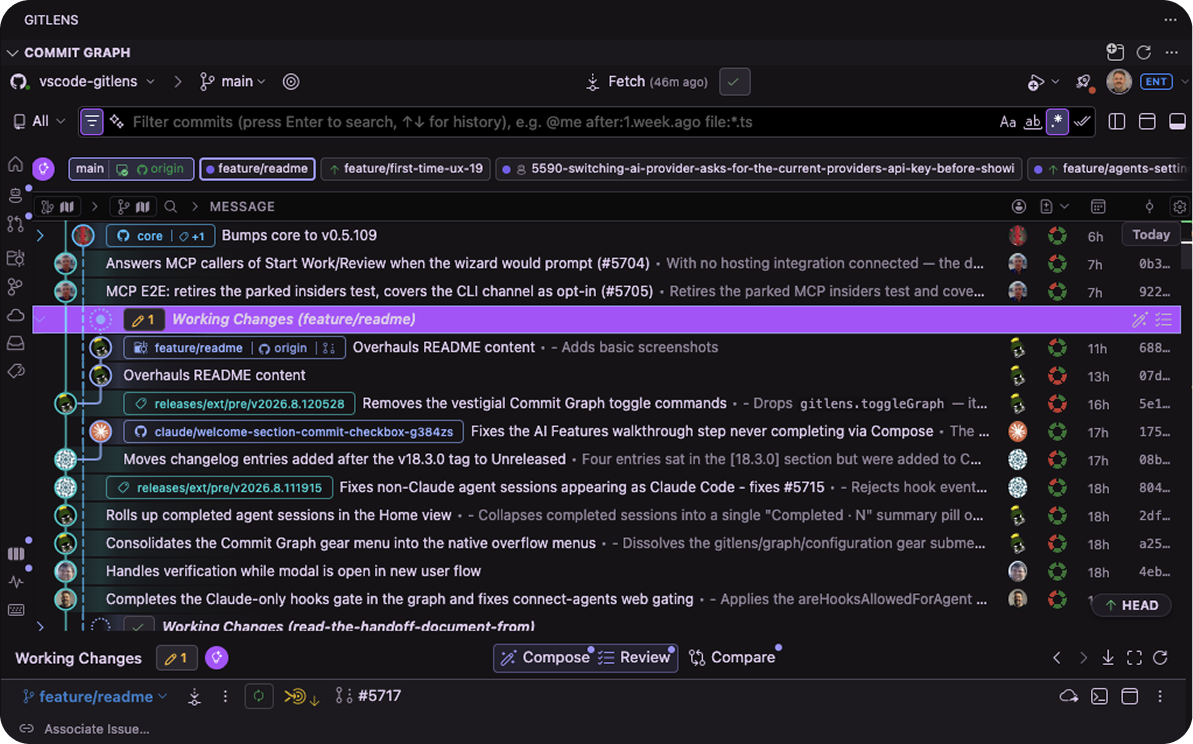
Answering "what is actually going on in this repo right now" usually takes a view for branches, another for stashes, a terminal for status, and a browser tab for pull requests. The Commit Graph answers it in one place, and lets you act on the answer. Learn more
- Live state on every row — ahead/behind, unpushed, unpulled, change size, and lanes you can fold away.
- Your uncommitted work, in the history — a row per worktree. Stage, commit, stash, or send it to Compose Commits.
- Act from the row — branch, merge, rebase, cherry-pick, revert, stash, push, pull, open a pull request.
- Details in place — commits, branches, stashes, pull requests, comparisons. They stack as sheets;
Escbacks out. - The whole repo in the side bar — Overview, Agents, Pull Requests, Worktrees, Branches, Remotes, Stashes, Tags. Click one to scope the graph.
- Search that speaks Git —
message:,author:,file:,change:, or just describe what you're after. - Always know where you are — jump to
HEAD, upstream, or merge target./finds any branch; the keyboard drives all of it.
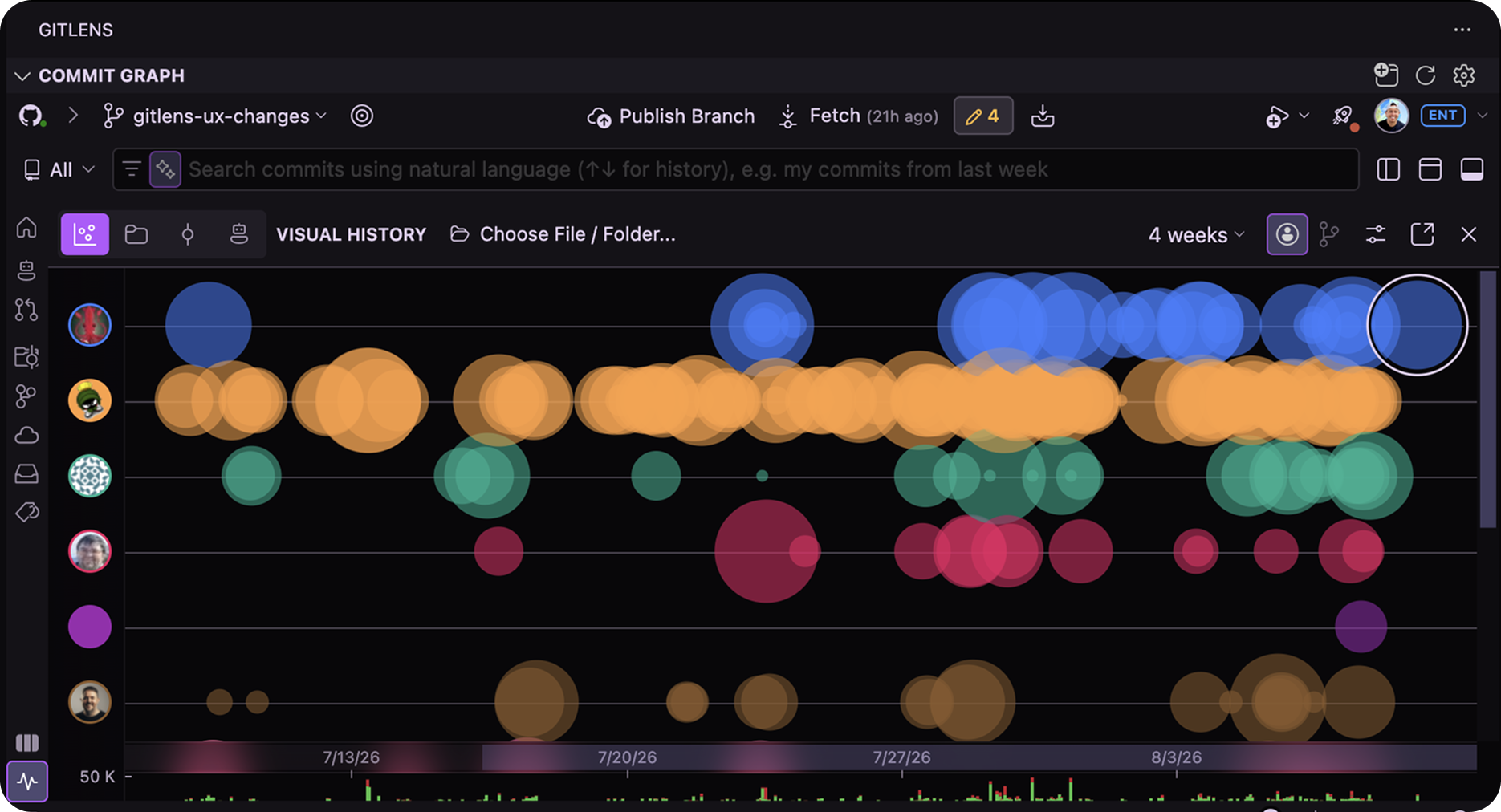
Who should I ask about this file? Where is all the churn? What has that agent actually been touching? A list of commits can't tell you.
- Visual History — a timeline of how a file or a repository evolved: when changes landed, how big they were, who made them. Good for finding the moment something turned, or who to ask about it.
- Files Treemap
Experimental— your repository as blocks sized by file and colored by type. Zoom into a folder to see what's actually in there. - Commits Treemap
Experimental— the same map, colored by how much each area has been changing. - Agent Activity Treemap
Experimental— the same map, live: where your agents are reading and editing right now, cooling as they move on.
Open these from the Commit Graph, or Visual History on its own with Show Visual History.
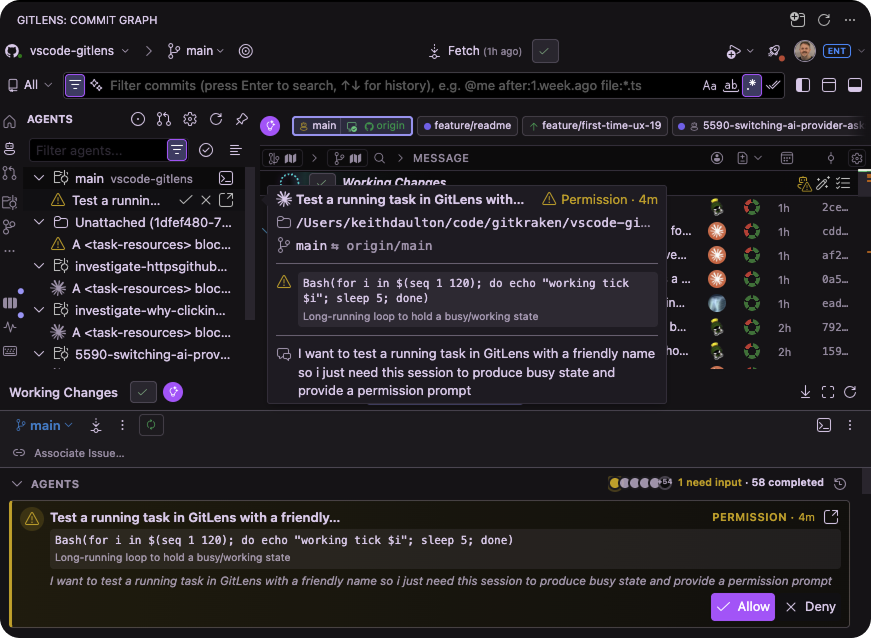
You stash to switch branches and lose your place. An agent is off working somewhere and you can't tell whether it's running, stuck, or waiting on you. Both get worse the more places your work lives.
A worktree is a second checkout of the same repository — a branch you can leave open without stashing a thing. GitLens takes over the bookkeeping around it.
- Create one from a branch, a commit, or a pull request, and open it in this window or a new one.
- Every worktree gets its own working-changes row in the Commit Graph, so you can see which are dirty without opening them.
- Move work across them — copy your working changes over, or apply a stash into another worktree.
- Open a terminal in one, reveal it in your file manager, or delete it when you're done.
- Agent sessions — Claude Code sessions show up in the Commit Graph with live state: working, idle, or needs input. Resume one straight from the row it's working on.
- Start Work with Agent — pick an issue and GitLens creates the branch or worktree, then hands it to a coding agent.
- Agent Kanban
Experimental— switch the Graph into a board view that groups agent sessions by what needs your attention first. - Terminal links — your agent prints a SHA, branch, tag, or range in the terminal. Click it and land on it in the Commit Graph.
- GitKraken MCP — give your coding agents structured access to your Git history, pull requests, and issues. Install it into Claude Code, Codex, Gemini CLI, GitHub Copilot CLI, OpenCode, or your IDE's built-in chat.
Pull requests are where work goes to wait. GitLens brings the whole round trip into the editor: Start Work turns an issue into a branch or worktree, Launchpad tracks what comes back, and you review and land it without leaving the graph.
Reviews shouldn't mean bouncing between your editor, GitHub, and your inbox. Launchpad puts every pull request you're involved in on one list, ordered by what's actually blocking someone. Check one out, or start its review with a coding agent, without opening a tab. Learn more
Open pull requests live in the Graph's Pull Requests panel, most recently updated first, marked with the same signals as Launchpad — mergeable, blocked, needs review, follow-up. Select one and its details open in place.
- Review it here — Compare Changes for the diff, or hand the whole thing to a coding agent with Review with Agent...
- Work on it — switch to the branch, open it in a worktree, or Focus the graph on just that branch, fetching the remote if you don't have it yet.
- Land it — merge, squash, or rebase from a split button that confirms in place.
- Stacked pull requests — GitHub stacks are grouped in the panel with each layer's position badged on its ref pills. Focusing any layer scopes the graph to the whole stack, and merging routes through GitHub's stack-aware merge, telling you how many pull requests will land.
Code that works isn't code that's merged. In between sit the commits nobody can follow, the message you have to write, the review round trip, and the afternoon the rebase ate. These shorten that stretch.
- Review Changes — a review before you open the pull request, reading your change as a whole instead of file by file. Hand the findings to a coding agent and it makes the fixes.
- Compose Commits — you've changed thirty things across a dozen files and it's one shapeless pile. Compose sorts it into separate commits that each do one thing. Recompose Commits does the same for a branch you've already committed to.
- Explain Changes — ask what a commit, a stash, a branch, or your own working changes actually did, in plain English.
- Generate Commit Message — and stash messages, and pull request titles and descriptions, written from what actually changed rather than from a blank box.
- Generate Changelog — release notes for a branch, a tag, or any range of commits you've compared.
Rebasing replays your commits onto a newer starting point. Rearranging them is the easy half. The conflicts are the part you're actually afraid of, and the reason the branch sat there for a week.
The Interactive Rebase Editor lets you drag commits to reorder them, or mark them to be squashed together, reworded, or dropped. As you rearrange, it works out which commits are going to conflict and warns you before you run anything, then collects every conflicted file into one panel showing both sides.
Automatic Rebase does the whole thing for you. It runs the rebase, resolves each conflict with AI, and shows you what it decided and how sure it was — stopping to ask when it isn't confident. If you don't like where it ended up, a single undo puts your branch back exactly as it was.
Whatever you host on and track issues in, GitLens most likely speaks it — and pulls those pull requests and issues in beside your history.
Autolinking works across GitHub, GitLab, Jira, Gitea, Gerrit, Google Source, Bitbucket, Bitbucket Server, Azure DevOps, and custom servers. The self-managed editions, GitHub Enterprise and GitLab Self-Managed, need Pro. Rich integrations with GitHub, GitLab, and Jira add hover details for autolinks, correlations between pull requests, branches, and commits, and user avatars.
On an unusual domain? Add a custom remote to map it onto a built-in provider, or teach GitLens a service it doesn't know. You can define your own autolinks too, for references like Jira issues or Zendesk tickets.
Everything GitLens built its reputation on: free, unchanged, and on by default.
- Inline and status bar blame — unobtrusive, line-by-line authorship at the end of the current line and in the status bar.
- Rich hovers — hover a blame annotation for commit details, linked issues and pull requests, and quick actions.
- Git CodeLens — recent change and authorship summaries at the top of each file and code block.
- File annotations — whole-file blame, recent changes, and a heatmap, rendered right in the editor.
- Revision navigation — step backward and forward through a file's history, one click at a time.
- File History and Line History — follow a whole file or a single line across renames and merges.
- Git Command Palette — a guided, step-by-step way to run Git commands without memorizing them, plus quick access to branch and file history, commit search, stashes, and repository status.
💡 Not for you? Every annotation is customizable, and Toggle Line Blame and Toggle Git CodeLens switch them off. The Help Center has the full list of settings.
Every part of your repository gets its own view, and they act as well as list. Most share one tabbed GitLens view in Source Control, so they sit a click apart instead of as eight collapsed headers fighting for room.
- Commits, Branches, Remotes, Stashes, Tags, Worktrees, and Contributors — browse any of them and act on what you find: check out, compare, stash, create a worktree, see who wrote what.
- Search & Compare — search history, or compare any two branches, tags, or commits, and keep the results pinned as long as you need them.
- Inspect and Pull Request — full details for whatever you've selected, and the pull request for the branch you're on.
- Repositories — the same, grouped per repository, for multi-root workspaces.
💡 Detach View pulls a tab out on its own, Detach All Views splits them all up, and Set as Default View picks which opens first. Reset Views Layout puts everything back.
Cloud Patches share work-in-progress, a commit, or a stash as a private link, and Cloud Workspaces group repositories together across machines. Both views are hidden by default — open them with Show Cloud Patches View or Show Cloud Workspaces View.
Community is free and open-source: blame, hovers, CodeLens, file annotations, revision navigation, the side bar views, the Interactive Rebase Editor, the Git Command Palette, integrations, and the GitKraken MCP.
On public repos, the Commit Graph, Worktrees, and Visual History are free too — the Commit Graph just needs a free GitKraken account.
Pro opens those on private repos and adds the rest: agent sessions and Agent Kanban, the Pull Requests panel with in-graph review and merge, Launchpad, and every AI feature on this page.
Start your free 14-day Pro trial — no credit card, and when it ends your public repos keep everything they had. Or read the full Community vs. Pro comparison.
Support documentation can be found on the GitLens Help Center. If you need further assistance or have any questions, there are various support channels and community forums available:
- Issues and feature requests — reach out on our GitHub Issues page.
- Discussions — connect with other users and talk to our engineering team on GitHub Discussions.
- GitKraken Support — for anything else, reach the support team via the official support page. GitLens Pro includes priority email support, plus custom onboarding and training to get your team up and running.
Having a positive experience with GitLens? Write a review — it genuinely helps.
GitLens is an open-source project that greatly benefits from the contributions and feedback from its community.
Your contributions, feedback, and engagement in the GitLens community are invaluable, and play a significant role in shaping the future of GitLens. Thank you for your support!
Want to contribute to GitLens? Follow the CONTRIBUTING docs to get started.
Contributions to the documentation are greatly appreciated. If you find any areas that can be improved or have suggestions for new documentation, you can submit them as pull requests to the GitLens Docs repository.
A big thanks to the people that have contributed to this project 🙏❤️:
- Zeeshan Adnan (@zeeshanadnan) — contributions
- Alex (@deadmeu) — contributions
- Abdulrahman (Abdu) Assabri (@abdusabri) — contributions
- Grey Baker (@greysteil) — contributions
- Loris Bettazza (@Pustur) — contributions
- Brian Bolte (@bolte-17) — contributions
- Zach Boyle (@zaboyle) — contributions
- Tony Brix (@UziTech) — contributions
- Matt Buckley (@Mattadore) — contributions
- Lee Chang (@MeltingMosaic) — contributions
- Amanda Cameron (@AmandaCameron) — contributions
- Martin Campbell (@martin-css) — contributions
- Brett Cannon (@brettcannon) — contributions
- Barney Carroll (@barneycarroll) — contributions
- Andrea Cigana (@ciganandrea) — contributions
- Ash Clarke (@ashclarke) — contributions
- Travis Collins (@TravisTX) — contributions
- Matt Cooper (@vtbassmatt) — contributions
- Skyler Dawson (@foxwoods369) — contributions
- Andrii Dieiev (@IllusionMH) — contributions
- egfx-notifications (@egfx-notifications) — contributions
- Segev Finer (@segevfiner) — contributions
- Cory Forsyth (@bantic) — contributions
- John Gee (@shadowspawn) — contributions
- Geoffrey (@g3offrey) — contributions
- Omar Ghazi (@omarfesal) — contributions
- Neil Ghosh (@neilghosh) — contributions
- Guillaume Rozan (@grozan) — contributions
- Guillem González Vela (@guillemglez) — contributions
- Vladislav Guleaev (@vguleaev) — contributions
- Dmitry Gurovich (@yrtimiD) — contributions
- hahaaha (@hahaaha) — contributions
- Victor Hallberg (@mogelbrod) — contributions
- Ken Hom (@kh0m) — contributions
- Yukai Huang (@Yukaii) — contributions
- Justin Hutchings (@jhutchings1) — contributions
- Roy Ivy III (@rivy) — contributions
- Helmut Januschka (@hjanuschka) — contributions
- jogo- (@jogo-) — contributions
- Nils K (@septatrix) — contributions
- Chris Kaczor (@ckaczor) — contributions
- Aidos Kanapyanov (@aidoskanapyanov) — contributions
- Allan Karlson (@bees4ever) — contributions
- Nafiur Rahman Khadem (@ShafinKhadem) — contributions
- Mathew King (@MathewKing) — contributions
- Lior Kletter (@Git-Lior) — contributions
- Chase Knowlden (@ChaseKnowlden) — contributions
- Andrei Korigodski (@korigod) — contributions
- Kwok (@mankwok) — contributions
- Marc Lasson (@mlasson) — contributions
- John Letey (@johnletey) — contributions
- Stanislav Lvovsky (@slavik-lvovsky) — contributions
- Peng Lyu (@rebornix) — contributions
- Cédric Malard (@cmalard) — contributions
- Asif Kamran Malick (@akmalick) — contributions
- Sam Martin (@smartinio) — contributions
- mcy-kylin (@mcy-kylin) — contributions
- Mark Molinaro (@markjm) — contributions
- Ahmadou Waly Ndiaye (@sir-kain) — contributions
- Nguyen Long Nhat (@torn4dom4n) — contributions
- Dave Nicolson (@dnicolson) — contributions
- Aurelio Ogliari (@nobitagit) — contributions
- Raaj Patil (@arrpee) — contributions
- Kevin Paxton (kpaxton) — contributions
- Connor Peet (@connor4312) — contributions
- Maxim Pekurin (@pmaxim25) — contributions
- Leo Dan Peña (@leo9-py) — contributions
- Aman Prakash (@gitgoap) — contributions
- Arunprasad Rajkumar (@arajkumar) — contributions
- David Rees (@studgeek) — contributions
- Rickard (@rickardp) — contributions
- Johannes Rieken (@jrieken) — contributions
- Daniel Rodríguez (@sadasant) — contributions
- Guillaume Rozan (@rozangu1) — contributions
- ryenus (@ryenus) — contributions
- Felipe Santos (@felipecrs) — contributions
- Andrew Savage (@andrewsavage1) — contributions
- Zack Schuster (@zackschuster) — contributions
- Matt Seddon (@mattseddon) — contributions
- Ahmadali Shafiee (@ahmadalli) — contributions
- Shashank Shastri (@Shashank-Shastri) — contributions
- Skybbles (@Luxray5474) — contributions
- Brendon Smith (@br3ndonland) — contributions
- Ross Smith II (@rasa) — contributions
- Oleg Solomka (@legomushroom) — contributions
- Miguel Solorio (@misolori) — contributions
- SpaceEEC (@SpaceEEC) — contributions
- stampyzfanz (@stampyzfanz) — contributions
- sueka (@sueka) — contributions
- Mike Surcouf (@mikes-gh) — contributions
- Alexey Svetliakov (@asvetliakov) — contributions
- Takashi Tamura (@tamuratak) — contributions
- Andy Tang (@thewindsofwinter) — contributions
- Dmitry Ulupov (@dimaulupov) — contributions
- Alexey Vasyukov (@notmedia) — contributions
- Ivan Volzhev (@ivolzhevbt) — contributions
- x13machine (@x13machine) — contributions
- Alwin Wang (@alwinw) — contributions
- Ian Wilkinson (@sgtwilko) — contributions
- Brian Williams (@Brcrwilliams) — contributions
- Adaex Yang (@adaex) — contributions
- Yan Zhang (@Eskibear) — contributions
- Zyck (@qzyse2017) — contributions
- Yonatan Greenfeld (@YonatanGreenfeld) — contributions
- WofWca (@WofWca) — contributions
- 不见月 (@nooooooom) — contributions
- Ian Chamberlain (@ian-h-chamberlain) — contributions
- Brandon Cheng (@gluxon) — contributions
- yutotnh (@yutotnh) — contributions
- may (@m4rch3n1ng) — contributions
- bm-w (@bm-w) — contributions
- Tyler Johnson (@TJohnsonSE) — contributions
- Jean Pierre (@jeanp413) — contributions
- Dawn Hwang (@hwangh95) — contributions
- Emmanuel Ferdman (@emmanuel-ferdman) — contributions
- Jordon Kashanchi (@jordonkash) — contributions
- JounQin (@JounQin) — contributions
- Noritaka Kobayashi (@noritaka1166) — contributions
- Daniel Asher (@danielasher115) — contributions
Also special thanks to the people that have provided support, testing, brainstorming, etc:
- Brian Canzanella (@bcanzanella)
- Matt King (@KattMingMing)
And of course the awesome vscode team!
This repository contains both OSS-licensed and non-OSS-licensed files.
All files in or under any directory named "plus" fall under LICENSE.plus.
The remaining files fall under the MIT license.