Right-to-left (RTL) support for T3 Code. Persian (Farsi) and Arabic chat messages, queued messages, thread titles, and question prompts read right to left, in a Persian font.


English · فارسی
t3code-rtl patches T3 Code locally. Persian and Arabic message blocks become RTL and use the bundled Arad font; code blocks, terminals, diffs, and the sidebar remain LTR.
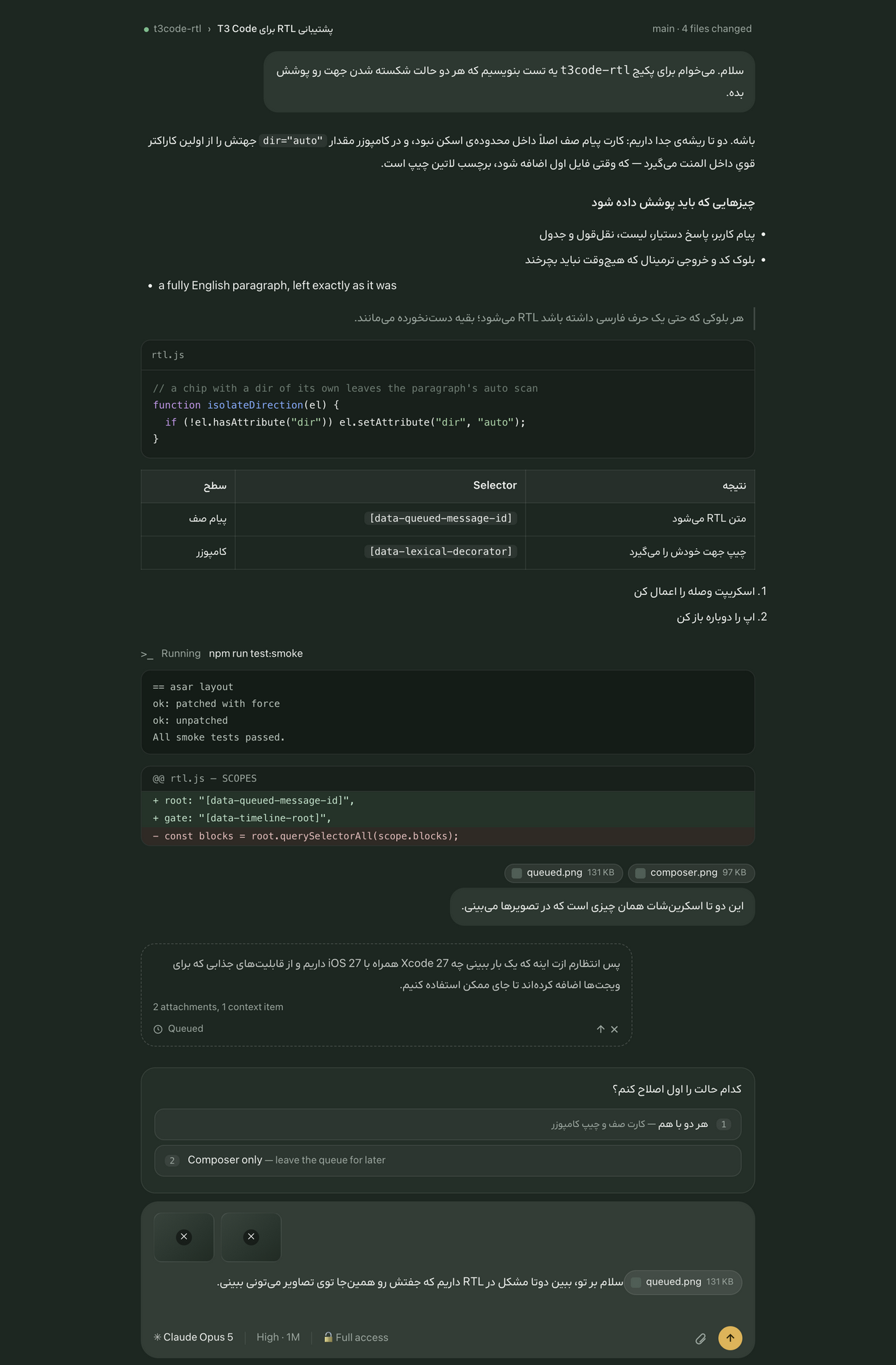
T3 Code lays Persian and Arabic chat text out left to right, which leaves punctuation and line breaks in the wrong place and makes a long message hard to follow. Three pull requests that would have added right-to-left support upstream (#1320, #1484, #2128) were closed without being merged. This tool fixes the copy of T3 Code on your own machine in the meantime.
Only blocks that contain Persian or Arabic text are affected, and only inside chat messages, queued messages, the thread title, and the drawer above the composer. Nothing else in T3 Code is changed.
- A paragraph, list item, heading, or table cell inside a chat message gets
dir="rtl"and the Arad font only if it contains at least one Persian or Arabic character. - The drawer above the composer — the question card, its options, approval requests — is treated the same way: a question, an option label, or an option description with Persian or Arabic text becomes RTL. An option row with RTL text also mirrors, so its shortcut number sits on the left.
- A message waiting in the queue is treated the same way: its text becomes RTL, while the
Queuedrow under it keeps the layout it has everywhere else. - The thread title in the chat header becomes RTL when it holds Persian or Arabic text, and the rename field follows whatever you type into it. The breadcrumb beside the title keeps its order.
- A table that holds Persian or Arabic text keeps its column order, but all of its cells are aligned to the right together, so one English cell does not leave the column ragged. Each cell still becomes RTL only on its own merits.
- Every block without such text is left exactly as it was — same direction, same font, same styling. A card with an English header and Persian options keeps the header LTR.
- Code blocks, inline code, diffs, terminal output, and keyboard shortcut badges are never flipped, even when they appear inside an RTL block.
- The composer input keeps the direction T3 Code gives it, which follows the first letter you type. The one change there: an attachment or mention chip gets
dir="auto", so a chip namedimage.pngno longer makes a Persian message left-to-right when the attachment comes first. - The sidebar, menus, settings, and the rest of the interface are never touched.
- Only the Arabic script is detected, which covers Persian, Arabic, Urdu, and Pashto. Hebrew and other right-to-left scripts are left alone.
The patch is a single small script injected into the app's index.html. It does not change any application logic, settings, data, or network behavior.
Warning
This unofficial tool modifies files inside the T3 Code application bundle. Reapply the patch after every T3 Code update.
Node.js 20 or later, plus one of these T3 Code installations:
- macOS desktop app: any
T3 Code*.appin/Applications. The managed update mode additionally requires the Homebrew caskt3-codeort3-code@nightly. - Linux desktop app:
/opt/t3code-binor/opt/t3code-nightly-bin(AUR packages). t3npm package (npm install -g t3, the same server thatnpx t3runs): detected automatically throughnpm root -g.- Windows desktop app:
%LOCALAPPDATA%\Programs\T3 Code(winget). Untested; report problems in the issue tracker.
Other locations can be supplied with T3CODE_APP_DIRS (one app or package directory per line).
npx t3@latest downloads a fresh copy into the npx cache on every run, so a patch applied there does not persist. Use npm install -g t3 and run t3 instead.
npx t3code-rtlThe first run detects T3 Code, asks how updates should work, applies the patch, and remembers the choice. Restart T3 Code afterwards. It has two update modes only:
- Managed (macOS, recommended): disables T3 Code's internal updater for this tool and uses
t3code-rtl updateto upgrade every installed T3 Code cask (t3-code,t3-code@nightly) via Homebrew and reapply the patch. Only offered when T3 Code was installed with Homebrew. The internal updater is turned off for every T3 Code app, so an app not installed with Homebrew stops updating;updatenames each such app and how to update it (for examplebrew install --cask --force t3-code@nightly). - Native: leaves T3 Code automatic updates enabled. After an update, run
npx t3code-rtl patchand restart the app.
No background watcher is installed.
The menu shows the t3code-rtl version and the installed T3 Code versions right away. While you choose, it asks the npm registry and the Homebrew API (formulae.brew.sh) for newer releases and lists any available update after the chosen action finishes, so the menu never waits on the network. status does the same check and waits up to three seconds for it.
npx t3code-rtl                 # interactive menu
npx t3code-rtl setup           # choose update strategy and patch
npx t3code-rtl patch           # apply the patch
npx t3code-rtl unpatch         # remove the patch, LaunchAgent, and settings
npx t3code-rtl status          # show detected apps, versions, patch state, update mode, and available updates
npx t3code-rtl doctor          # show detailed diagnostics
npx t3code-rtl update          # Homebrew update + patch on macOS
To install a permanent command instead:
npm install -g t3code-rtl
t3code-rtlRun npx t3code-rtl status to see whether each detected app is currently patched. After a T3 Code update the state returns to not patched; run patch again.
npx t3code-rtl doctor prints the platform, config path, Homebrew and LaunchAgent state, and the bundle layout and ASAR integrity setting for each app.
"ASAR integrity validation is enabled; refusing to patch" — the installed T3 Code build verifies its app.asar and would refuse to start after modification. The tool stops rather than break the app. If you want to try anyway, run with T3CODE_RTL_FORCE=1; reinstall T3 Code if it no longer starts.
The t3 npm package serves the same web client as the desktop app, so it is a safe way to try the patch:
mkdir t3-sandbox && cd t3-sandbox && npm install t3@latest
T3CODE_APP_DIRS="$PWD/node_modules/t3" npx t3code-rtl patch
npx t3 start --port 4711 --base-dir "$PWD/data"
Open the printed URL and send a Persian or Arabic message. npx t3code-rtl unpatch with the same T3CODE_APP_DIRS reverts it; delete the sandbox directory when done.
Contributors can run the automated version of this, which cleans up after itself: npm run test:smoke (fake bundles) or SMOKE_T3=1 npm run test:smoke (also the real t3 package).
media/preview.html is a static copy of T3 Code's markup that loads rtl.js the same way the patch does. Serving the repository root and opening it is the quickest way to see a change to rtl.js; it is also where the screenshot above comes from.
Yes. Farsi and Persian are the same language. The patch looks for Arabic-script characters, so it also covers Arabic, Dari, Urdu, and Pashto. Hebrew is not detected.
No. It adds a dir attribute and a font to blocks that already hold Persian or Arabic text, in the page T3 Code renders. Application logic, settings, stored threads, and network requests are untouched.
No. An update replaces the files the patch writes to. Run npx t3code-rtl patch again, or pick managed mode on macOS, where t3code-rtl update upgrades the Homebrew cask and reapplies the patch in one step.
npx t3code-rtl unpatch removes the injected block, the LaunchAgent, and the settings. Reinstalling T3 Code through its package manager restores the original bundle byte for byte.
No. It is an unofficial patch, written against the markup T3 Code happens to render today, and it can break when that markup changes. Report anything it breaks in the issue tracker.
The patch is idempotent: each application replaces the prior injected block. Current ASAR layouts are changed in place and receive an unpacked index.html override. unpatch removes the injected block and the LaunchAgent; reinstall T3 Code through its package manager to restore the original bundle byte for byte.
The code is MIT licensed.
The bundled font is Arad 2.4.0, the AradNL variable build, copied from upstream without changes and licensed under the SIL Open Font License 1.1. The patcher embeds it in the page it injects, and the same notice is repeated there.