
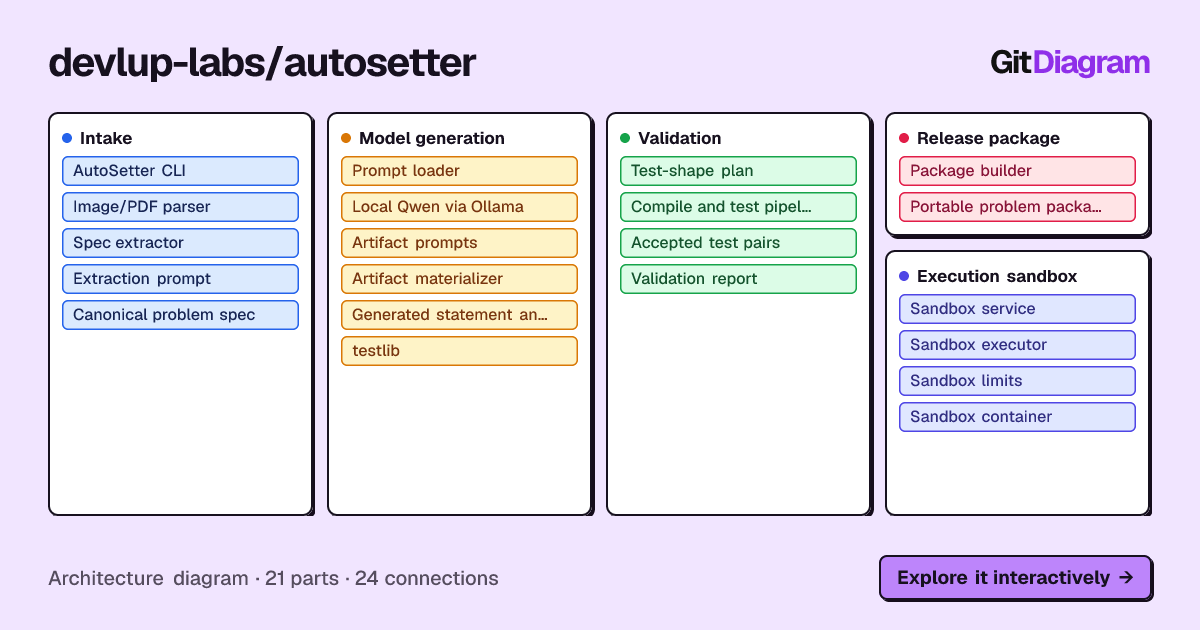
AutoSetter turns a competitive programming problem statement (image or PDF) into a verified Polygon package and pushes it to Codeforces Polygon. The package holds the specification (problem.json), statement, main and wrong solutions, testlib validator and checker, official samples, generated tests and a validation report.
Before generating anything, AutoSetter checks a vector database of existing problems. If the problem is already there, it prints the link instead of building a duplicate.
statement image / PDF
         │  qwen3-vl:32b  (Ollama on the GPU server, reached over SSH)
         ▼
    problem.json ──► vector database (Qdrant), KNN k=1
         │              cosine > 80%? ──► print link to existing problem, stop
         ▼
    Qwen3-Coder-Next ──► statement, solutions, validator, checker, test_spec.json
         │               test_spec.json ──► Z3 ──► test inputs
         ▼
    validate (compile, samples, generate, validate, solve, probe checker) + self-healing
         ▼
    out/package/  (Polygon package)
         │  Polygon API key + secret (asked for when the run starts)
         ▼
    Polygon: create problem, upload everything, commit, build package
See ARCHITECTURE.md for the full design.

python3 -m venv .venv && source .venv/bin/activate
pip install -e ".[similarity]"          # installs the `autosetter` command

autosetter statement.png --ssh <user>@<gpu-server>
AutoSetter then:
- asks for your Polygon API key and secret, and checks them with Polygon,
- opens an SSH tunnel to the GPU server running Ollama,
- extracts
problem.json, looks the problem up in the vector database, and stops with a link if it already exists, - generates, validates and packages the problem in
out/package/, - creates the problem on Polygon and uploads the package.
- Python 3.10+
g++on PATH (C++17)sshclient (to reach the GPU server)- Access to an Ollama server with the models below (see Models & SSH)
- Optional: a running Qdrant instance with the problem collection (see Existing-problem check)
python3 -m venv .venv
source .venv/bin/activate

pip install -e .                  # core pipeline + Polygon upload
pip install -e ".[similarity]"    # + vector-database search (sentence-transformers, torch, qdrant-client)
pip install -e ".[dev]"           # + pytest
pip install -r requirements.txt (core) and pip install -r vector_database/requirements.txt (search) still work if you prefer not to install the package. Then use python app.py ... or python -m autosetter ... in place of autosetter ....
| Role | Model | Used for |
|---|---|---|
| Vision | qwen3-vl:32b |
Reading the statement image/PDF into problem.json |
| Text / code | Qwen3-Coder-Next:latest |
Statement, solutions, validator, checker, Z3 test spec, self-healing fixes |
| Embeddings | BAAI/bge-small-en-v1.5 |
Existing-problem search (runs locally, on CPU if there is no GPU) |
The two Qwen models are too large for a laptop, so they run under Ollama on a GPU server. Its Ollama port (11434) is not exposed, so AutoSetter reaches it through an SSH tunnel.
ollama pull qwen3-vl:32b
ollama pull Qwen3-Coder-Next:latest
ollama serve # listens on localhost:11434Option A: let AutoSetter open the tunnel (recommended)
autosetter statement.png --ssh <user>@<gpu-server>
# or set it once:
export AUTOSETTER_SSH_HOST=<user>@<gpu-server>
autosetter statement.png
AutoSetter runs ssh -N -L 11434:localhost:11434 <user>@<gpu-server> for the length of the run and points the Ollama client at http://localhost:11434. If ssh asks for a password or key passphrase, type it in the same terminal. If port 11434 is already open locally (say, a tunnel you started yourself or a local Ollama), it is reused.
You can use an alias from ~/.ssh/config as the host. Use this when the server needs a particular key, port or jump host:
# ~/.ssh/config
Host autosetter-gpu
    HostName <gpu-server-address>
    User <user>
    IdentityFile ~/.ssh/id_ed25519
    # ProxyJump <bastion>         # if the server is only reachable via a bastion
autosetter statement.png --ssh autosetter-gpuOption B: open the tunnel yourself
ssh -N -L 11434:localhost:11434 <user>@<gpu-server>      # leave running
autosetter statement.png                                 # uses http://localhost:11434
Option C: no tunnel. Point --host / OLLAMA_HOST at any reachable Ollama, for example a local one or a Colab + Cloudflare tunnel URL.
| Setting | Flag | Environment variable | Default |
|---|---|---|---|
| SSH host / alias | --ssh |
AUTOSETTER_SSH_HOST |
(none: no tunnel) |
| SSH port | --ssh-port |
AUTOSETTER_SSH_PORT |
22 |
| SSH private key | --ssh-key |
AUTOSETTER_SSH_KEY |
ssh's default |
| Local tunnel port | --ssh-local-port |
AUTOSETTER_SSH_LOCAL_PORT |
11434 |
| Ollama port on server | --ssh-remote-port |
AUTOSETTER_SSH_REMOTE_PORT |
11434 |
| Tunnel ready timeout (s) | AUTOSETTER_SSH_TIMEOUT |
60 |
|
| Ollama URL (no tunnel) | --host |
OLLAMA_HOST / AUTOSETTER_OLLAMA_HOST |
http://localhost:11434 |
| Vision model | --vision-model |
AUTOSETTER_VISION_MODEL |
qwen3-vl:32b |
| Text model | --text-model |
AUTOSETTER_TEXT_MODEL |
Qwen3-Coder-Next:latest |
After extraction, problem.json is embedded the same way as the stored problems, and the database returns its single nearest neighbour (k=1). The Qdrant collection uses cosine distance over normalized embeddings, so the score is the cosine similarity.
- Score > 0.80: the problem already exists. AutoSetter prints its title, similarity and link, writes
out/similar_problems.json, and exits with code3. Nothing is generated or uploaded. - Score ≤ 0.80: the match is shown for reference and generation continues.
- Database unavailable (Qdrant down, collection missing, search dependencies not installed): the check is skipped with a warning and generation continues.
$ autosetter theatre_square.png
...
Searching vector database for an existing copy of this problem...
  0.9312  Theatre Square  https://codeforces.com/problemset/problem/1/A
Existing problem found: Theatre Square (cosine similarity 93.12% > 80%)

This problem already exists (93.12% similar): Theatre Square
https://codeforces.com/problemset/problem/1/A
Re-run with --force to generate a package anyway.
| Flag | Environment variable | Default | Meaning |
|---|---|---|---|
--similar-k |
AUTOSETTER_SIMILARITY_K |
1 |
Nearest problems to retrieve (the gate always uses the best one) |
--similarity-threshold |
AUTOSETTER_SIMILARITY_THRESHOLD |
0.80 |
Cosine similarity above which a problem counts as existing |
--force |
off | Generate anyway when a match is found | |
--no-similarity |
AUTOSETTER_SIMILARITY=0 |
on | Skip the check |
QDRANT_URL |
http://localhost:6333 |
Database connection | |
QDRANT_COLLECTION |
competitive_programming_problems |
Collection name | |
QDRANT_API_KEY |
(none) | For Qdrant Cloud | |
EMBEDDING_MODEL |
BAAI/bge-small-en-v1.5 |
Must match the model used to build the database |
To build the database (collect Codeforces/LeetCode problems, embed them, upload them to Qdrant), see vector_database/README.md. To try a query by hand:
python vector_database/scripts/test_search.py "shortest path in a weighted graph" # k=1 by defaultautosetter path/to/statement.png [options]
autosetter path/to/statement.pdf --num-tests 20
python -m autosetter statement.png # same CLI without installing
python app.py statement.png # same CLI without installingpositional arguments:
image_path Statement image (.png/.jpg/.jpeg) or PDF
models:
--vision-model MODEL Ollama vision model (default: qwen3-vl:32b)
--text-model MODEL Ollama text model (default: Qwen3-Coder-Next:latest)
--host URL Ollama URL (default: http://localhost:11434); ignored with --ssh
SSH tunnel to the Ollama GPU server:
--ssh USER@HOST Reach Ollama through an SSH tunnel (host or ~/.ssh/config alias)
--ssh-port PORT SSH port (default: 22)
--ssh-key FILE Private key file
--ssh-local-port PORT Local end of the tunnel (default: 11434)
--ssh-remote-port PORT Ollama port on the server (default: 11434)
pipeline:
--num-tests N Test cases to generate (default: 10)
--skip-validation Skip compilation and validation
--out-dir DIR Output directory (default: out/)
existing-problem check:
--no-similarity Skip the vector-database lookup
--similar-k K Nearest problems to retrieve (default: 1)
--similarity-threshold T Cosine similarity that counts as existing (default: 0.8)
--force Generate even if the problem already exists
Polygon upload:
--no-polygon Don't ask for credentials or upload
--polygon-problem-id ID Update an existing Polygon problem instead of creating one
--polygon-name NAME Name for the new Polygon problem (default: from the title)
--push-unverified Upload even if validation did not pass
| Code | Meaning |
|---|---|
0 |
Package verified fit to release (and uploaded to Polygon, if credentials were given) |
1 |
Pipeline failed (bad input, model/SSH error, rejected Polygon credentials, ...) |
2 |
Package built but not fit to release (validation failed); not uploaded unless --push-unverified |
3 |
The problem already exists; its link was printed |
4 |
Package verified, but the Polygon upload failed; retry with python -m autosetter.polygon out/package |
Set AUTOSETTER_DEBUG=1 to see raw model output.
AutoSetter uses Polygon's API to create the problem and upload the package.
- Get a key. On polygon.codeforces.com, open Settings → API Keys and create a key. You get an API key and a secret.
- Enter them when asked. When you run
autosetterin a terminal, it asks first, before the long pipeline starts:$ autosetter statement.png --ssh autosetter-gpu Polygon API key (blank to skip upload): 3f2c... Polygon API secret: ← typed without echo Polygon credentials verified. Opening SSH tunnel localhost:11434 -> autosetter-gpu:11434... ... Pushing package to Polygon... Created Polygon problem 'a-plus-b' (ID 412345). ▶ Setting limits: 1000 ms, 256 MB... ... ▶ Committing changes... ▶ Requesting package build (with verification)... Polygon problem: a-plus-b (ID 412345)- The credentials are checked right away (a
problems.listcall). If Polygon rejects them, you get up to three tries. - Leave the key blank (or pass
--no-polygon) to build the package without uploading. - Credentials are only kept in memory for the run. They are never written to disk.
- The credentials are checked right away (a
- Or use environment variables. If
POLYGON_API_KEYandPOLYGON_SECRETare set, pressing Enter at the prompts uses them. In non-interactive runs (CI, scripts, piped stdin) they are the only source, and the upload is skipped if they are not set.export POLYGON_API_KEY="your-api-key" export POLYGON_SECRET="your-secret"
What gets uploaded. Unless you pass --polygon-problem-id, a new problem is created and named after the title (lowercase with dashes, for example a-plus-b). If that name is taken, a timestamp suffix is added. Then AutoSetter uploads:
- time and memory limits from
problem.json - checker, validator and
testlib.h - the generator, when there is a testlib
generator.cpp - solutions with verdict tags:
solution.cppis MA (main),solution.greedy.cppis WA,solution.brute.cppandsolution.heavy.cppare TL - the statement (legend, input, output and notes from
problem.json) - tests: official samples first, marked for the statement, then the generated tests
- the test script and tags, when present
Finally it commits the changes and requests a verified package build. Only packages that passed validation are uploaded unless you pass --push-unverified.
Upload an existing package (for example after fixing something by hand):
python -m autosetter.polygon out/package                    # create a new problem
python -m autosetter.polygon out/package 412345             # update problem 412345
autosetter-polygon out/package --name my-problem            # installed console script
This prompts for the credentials too, unless you pass --key/--secret or set the environment variables.
out/
  problem.json            # Extracted problem specification
  similar_problems.json   # Nearest stored problem(s) and cosine similarity
  generated/              # statement.md, test_spec.json and C++ sources
  tests/                  # 001.in / 001.ans, validation_report.json, rejected/
  package/                # Polygon package (below)
package/
├── problem.json            # Title, limits and statement sections used for Polygon
├── statement.md            # Markdown statement
├── solutions/
│   ├── solution.cpp        # Main solution (MA)
│   ├── solution.greedy.cpp # Wrong solution (WA)
│   ├── solution.brute.cpp  # Slow solution (TL)
│   └── solution.heavy.cpp  # Slow solution (TL)
├── files/
│   ├── validator.cpp       # testlib validator
│   ├── checker.cpp         # testlib checker
│   ├── test_spec.json      # Z3 test spec (or generator.cpp / generator.py)
│   └── testlib.h
├── samples/                # Official samples (01.in / 01.ans, ...), shown in the statement
├── tests/                  # Generated tests (001.in / 001.ans, ...)
├── script                  # Polygon test script (only with a testlib generator.cpp)
├── testlib.h
├── validation_report.json
└── manifest.json           # File list, sample/test counts, ready_for_release
When one model writes every file from the same JSON, the files can share the same mistakes. AutoSetter has three independent checks:
- Official samples check the validator. The statement's samples are known-good input, so a correct validator must accept all of them. If it rejects one, the validator (or the extracted constraints) is flagged.
- The validator checks the generator. Every generated test is validated. If the validator accepts the official samples but rejects a generated test, the generator is blamed.
- Wrong outputs probe the checker. Running the checker on the reference solution's own output only shows that x == x. AutoSetter also feeds the checker corrupted outputs (empty, truncated, perturbed numbers). A checker that accepts them is marked untrusted.
When a check fails, the files at fault are regenerated with the error as feedback (up to 3 self-healing iterations).
Instead of writing a generator program, the text model writes test_spec.json. It describes the input declaratively: integers with bounds, arrays, strings, permutations, matrices, rows of queries, trees and graphs; per-test constraints such as k <= n; file-wide constraints such as sum(n) <= 200000; and the line layout. The prompt is autosetter/prompts/test_spec.txt, and the engine is autosetter/testgen/.
- Z3 solves the integers. Every integer of every test case in the file is a Z3 variable with its bounds and constraints. The integers are fixed one at a time: Z3 reports the feasible range and the seed's strategy picks a value within it, so relations and sums always stay satisfiable.
- Builders fill in the bulk. Arrays, strings, trees and graphs are built directly at the sizes Z3 chose, so max-size tests (e.g. n = 2·10⁵) take about a second.
- Each seed has a strategy: 1 = all minimum, 2 = all maximum, then random, small, near-maximum, log-scaled and so on (
testgen.engine.PLAN), with matching shapes (sorted arrays, path/star trees, ...). - The spec is checked against the official samples. Samples are parsed with the spec's layout. A spec that rejects a sample goes back to the model with the exact problem, like a C++ compile error.
- Every generated input is parsed back and re-checked against the spec before it reaches the validator.
python -m autosetter.testgen out/generated/test_spec.json 1 10 -o /tmp/tests
python -m autosetter.testgen out/generated/test_spec.json --check-samples out/problem.json
Settings: AUTOSETTER_Z3_TIMEOUT_MS (per solver call, default 10000) and AUTOSETTER_Z3_MAX_CASES (most test cases per multi-test file, default 30).
Limits: the spec describes value ranges and structure, not properties that relate elements to each other ("exactly one pair sums to target"). The validator still rejects tests that break such guarantees. Z3 tests ship as files in package/tests/, because Polygon cannot run Z3.
AutoSetter/
├── ARCHITECTURE.md / README.md
├── app.py                  # Entry point (same as `autosetter` / `python -m autosetter`)
├── pyproject.toml          # Package metadata, `autosetter` and `autosetter-polygon` commands
├── autosetter/             # Core package
│   ├── cli.py              # CLI: arguments, Polygon credential prompt, SSH tunnel, exit codes
│   ├── runner.py           # Pipeline driver: extract → existing-problem check → generate → validate → package
│   ├── config.py           # Defaults and environment variables
│   ├── remote.py           # SSH tunnel to the Ollama GPU server
│   ├── llm.py              # Ollama client (vision + text)
│   ├── vision.py           # Image/PDF loading
│   ├── extractor.py        # Vision extraction → problem.json
│   ├── similarity.py       # Vector-database connection, k=1 search, 80% threshold
│   ├── generator.py        # Statement, solutions, validator, checker, test spec
│   ├── testgen/            # Z3 test generation
│   ├── sandbox.py          # Compilation and execution
│   ├── pipeline.py         # Validation engine (samples, tests, checker probes)
│   ├── packager.py         # Polygon package assembly + manifest
│   ├── polygon.py          # Polygon API client, problem creation and upload
│   ├── prompts/            # Prompt templates
│   └── include/testlib.h
├── vector_database/        # Problem collection, embedding and Qdrant upload; search.py
├── sandbox/                # Docker + NsJail execution pool
├── tests/                  # pytest suite (models, Qdrant, Polygon and SSH are stubbed)
└── example/                # Recorded example run
pip install -e ".[dev]"
pytest
The suite stubs Ollama, Qdrant, the Polygon API and ssh, so no models, database, credentials or server are needed.
For production isolation of untrusted code, sandbox/ provides a Docker + NsJail worker pool:
bash sandbox/scripts/build.sh    # Builds the autosetter-nsjail Docker image
bash sandbox/scripts/start.sh    # Starts the Express pool manager on port 3000
bash sandbox/scripts/stop.sh     # Shuts down workers
Limits are configured in sandbox/server/src/config.js.