


Type-safe WebSockets for JavaScript and TypeScript, end to end.
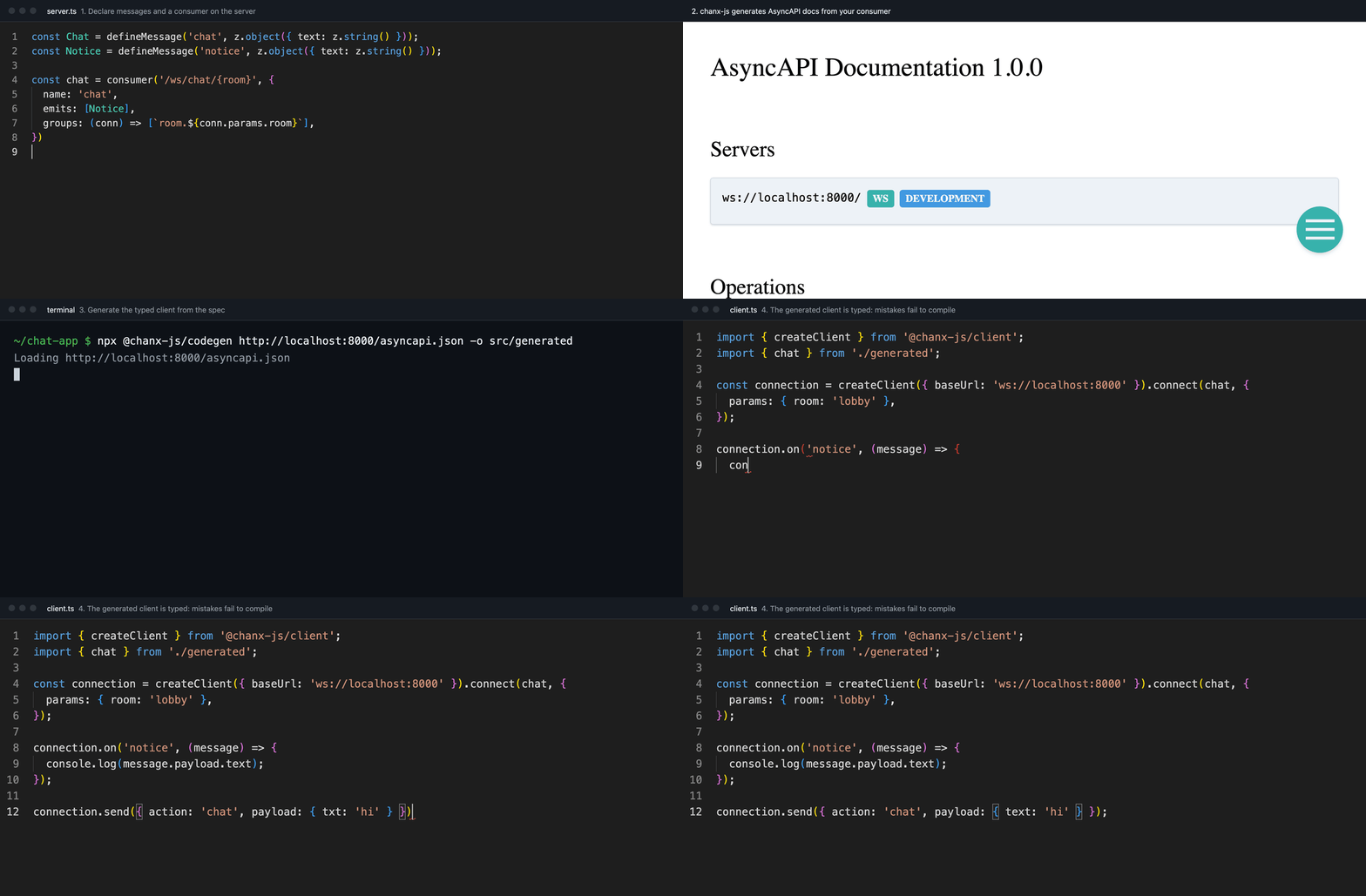
Declare your messages once, and chanx-js types both ends of the socket:
- Server (
@chanx-js/server): routes each message by action to a validated, typed handler, broadcasts to groups (across processes over Redis), and documents the API as AsyncAPI. Runs on Node withws, Express, Koa, Fastify, Hono, NestJS, Bun and Deno. - Client (
@chanx-js/clientand@chanx-js/codegen): generated from the server's AsyncAPI, so a message the server does not accept fails to compile. Works in the browser, React, Vue, Svelte, Solid and Node services.
It speaks the chanx protocol, so a chanx-js client also talks to Python chanx servers (Django Channels, FastAPI), and Node and Python servers can share one Redis.
Documentation · Why chanx-js? · Server guide · Client guide · API reference
Without it, both ends parse strings and hope:
// server
socket.on('message', (raw) => {
  const data = JSON.parse(String(raw));
  if (data.action === 'chat') {
    if (typeof data.payload?.text !== 'string') return socket.send('{"error":"bad"}');
    for (const peer of rooms.get(room) ?? []) peer.send(JSON.stringify(/* ... */));
  } else if (data.action === 'ping') {
    socket.send(JSON.stringify({ action: 'pong' }));
  } // ...and on, with no docs and no types
});

// client
ws.onmessage = (event) => {
  const message = JSON.parse(event.data); // any
};
With it, each end is typed from the other:
// server
const chat = consumer('/ws/chat/{room}', {
  groups: (conn) => [`room.${conn.params.room}`],
}).on(Chat, { output: Notice }, (m, ctx) =>
  ctx.broadcast(Notice.create({ text: m.payload.text })),
);

// client, generated from the server's AsyncAPI
connection.on('notice', (message) => message.payload.text); // string
connection.send({ action: 'chat', payload: { txt: 'hi' } }); // compile error
What it takes off your hands:
- Routing: handlers per action, not
if/elsechains. - Validation: payloads checked by Zod, Valibot, ArkType or any Standard Schema.
- Groups and broadcasts: across processes, through a Redis layer compatible with Python's.
- Topics: many subscriptions over one socket, reference counted, restored on reconnect.
- Requests:
await connection.request(...)gets the reply to that message, typed from the server's schema. - Docs and clients: AsyncAPI 3 from your code, and a typed client generated from it.
- Testing: helpers to send, receive and capture broadcasts in your test runner.
A server, on Node's own HTTP server:
npm install @chanx-js/server ws zod// server.ts
import { createServer } from 'node:http';
import { z } from 'zod';
import {
PingMessage,
PongMessage,
consumer,
createChanx,
defineMessage,
} from '@chanx-js/server';
import { asyncapiMiddleware, attachChanx } from '@chanx-js/server/node';
const Chat = defineMessage('chat', z.object({ text: z.string() }));
const Notice = defineMessage('notice', z.object({ text: z.string() }));
const chat = consumer('/ws/chat/{room}', {
name: 'chat',
groups: (conn) => [`room.${conn.params.room}`],
})
.on(PingMessage, { output: PongMessage }, () => PongMessage.create())
.on(Chat, { output: Notice }, (m, ctx) =>
ctx.broadcast(Notice.create({ text: m.payload.text })),
);
const chanx = createChanx({ consumers: [chat] });
const server = createServer(asyncapiMiddleware(chanx)); // docs at /asyncapi
attachChanx(server, chanx);
server.listen(8000);A client, generated from the running server:
npm install @chanx-js/client
npx @chanx-js/codegen http://localhost:8000/asyncapi.json   # writes src/generated
// client.ts
import { createClient } from '@chanx-js/client';
import { chat } from './src/generated/index.js';
const client = createClient({ baseUrl: 'ws://localhost:8000' });
const connection = client.connect(chat, { params: { room: 'lobby' } });
connection.on('notice', (message) => console.log(message.payload.text));
const pong = await connection.request({ action: 'ping' }); // typed: PongMessage
connection.send({ action: 'chat', payload: { text: 'hello' } });Run the server, then the client: it prints hello, broadcast back to everyone in
lobby. The same client runs in a browser, in React through useChannel, or in another
Node service (Node 22 or later has WebSocket built in).
| Package | What it does |
|---|---|
@chanx-js/server |
Consumers, topics, groups, AsyncAPI and testing helpers. |
@chanx-js/client |
The client runtime, with no dependencies, plus React, Vue, Svelte, Solid bindings. |
@chanx-js/codegen |
Generates typed channels from any chanx AsyncAPI schema, Node or Python. |
@chanx-js/layers |
Channel layers, so broadcasts reach every process; Redis, shared with Python. |
@chanx-js/nestjs |
Consumers and topics as NestJS gateways, with guards, pipes and DI. |
Every package's major version follows chanx's: 2.x speaks the chanx 2 protocol, so any 2.x client works with any 2.x server.
- Servers: Node's
http, Fastify, Hono, NestJS, and Bun, Deno and other runtimes through crossws. - Clients: browsers, React, Vue, Svelte, Solid, and Node, Bun or Deno scripts and services.
- Python: chanx servers on Django Channels or FastAPI.
- chanx: the original, for Django Channels and FastAPI.
- chanx-go: the Go implementation, servers and a typed client generator, on the same protocol and Redis layer.
- chanx-kit: WebSocket components for chanx, such as notifications, chat and presence, copied into your project in one command.
See CONTRIBUTING.md for setup, tests and releases, and the design notes for why things are built the way they are.
MIT