
Download on CurseForge · GitHub release
Click-to-heal on Blizzard party, raid and friendly target frames in WoW Forever.
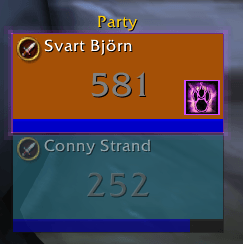
- Custom mouse bindings with Shift, Ctrl and Alt.
- Healing presets for druid, priest, paladin and shaman.
- Missing-buff reminders outside combat.
Type /ahb or open Options → AddOns → AggeHealBot for settings.
For Forever 1.60.1. Every cast requires a click.
Auto Self Cast: Your game-wide preference stays unchanged. Frame clicks use explicit unit targeting. If an older addon version turned Auto Self Cast off, you can re-enable it in WoW's settings.
Manual installation
Extract the addon ZIP into your Forever client's Interface/AddOns folder. The path should be Interface/AddOns/AggeHealBot/AggeHealBot.toc. Restart the game after first installation.
Full binding reference, buff behavior and development
| Click | Spell or action |
|---|---|
| Left | Regrowth |
| Right | Healing Touch |
| Middle | Rejuvenation |
| Ctrl + Left | Remove Curse |
| Ctrl + Right | Nature's Cure, or Abolish Poison / Cure Poison if learned |
| Ctrl + Middle | Nourish, or Swiftmend if learned |
| Button 4 | Unit menu |
| Button 5 | AggeHealBot settings |
| Shift + Left | Target |
| Shift + Right | Unit context menu |
| Shift + Middle | AggeHealBot settings |
| Shift + Button 4 | Assist |
| Shift + Button 5 | Unassigned |
Spells use names without a fixed rank, allowing the client to select the highest learned rank. Unlearned default bindings are marked and inactive. Any binding can be changed or restored in /ahb. Select a modifier tab, then click a mouse button or its icon beside the diagram to choose its binding. All five assigned icons remain visible around the mouse. The selected control pulses red, and its full spell icon/name appears centered below. Hover text follows the selected modifier.
The spell picker opens on Suggested, combining heals, buffs and utility. All, at the far right, includes all listed spells and actions. Actions also have their own tab. Unlearned spells are included when Show unlearned is enabled.
Show unlearned, at the top right of the spell picker, adds your class's unlearned healing and support spells. It is off by default. These entries are dimmed and explain their status on hover. You can bind them in advance; they remain inactive until learned and stay saved if you hide unlearned spells again. Offensive spells are not added to this optional catalogue.
Missing-buff priority is on by default. It applies only outside combat and only when plain left click is assigned a spell. Every cast still requires a click.
- Druid: Mark of the Wild, then Thorns. Gift of the Wild satisfies Mark.
- Priest: Fortitude, Divine Spirit and Shadow Protection, when learned. Their group versions satisfy the corresponding buff.
Paladins get a Paladin blessings... button in /ahb. Suggested defaults use Might for warriors and rogues, and Wisdom for everyone else, including druids regardless of form. Choose a different blessing for druids with their class override. Auto falls back to Kings if the suggested spell is unlearned and Kings is available. Each class has a dropdown for Auto, Might, Wisdom, Kings or Off, alongside its class icon and colored name. Click Paladin blessings again to return to bindings. Only one selected blessing is watched per class, and equivalent greater blessings satisfy the watch. The watcher casts single-target blessings rather than reagent-consuming group versions. Shaman buffs remain manually bindable without automatic watch rules. Cure and resurrection watching support all four healer classes.
Once the unit has its buffs, left click returns to its assigned spell. The buff icon and outline disappear when buffs are complete, combat begins, a modifier is held or buff priority is turned off. Unreachable buff targets are blocked instead of falling through to another spell.
Below 90% health, your assigned heal takes priority over missing buffs. Buff watching resumes at 90% or higher. This uses readable health data outside combat; cure and resurrection priority are unchanged. Availability hints explain known range, mana/power, cooldown and unusable-spell conditions in the binding tooltip. Unavailable watcher spells keep a dim icon and stop glowing; the game still validates the cast. The global cooldown does not dim all spells.
The watcher compares your highest learned single-target buff rank with the active buff's spell ID. A weaker known rank gets an upgrade icon, glow and left-click action. An equal or stronger rank satisfies the watcher, including equivalent group buffs such as Gift of the Wild and the priest Prayers. Unknown ranks with a matching buff name are left alone rather than assumed weaker.
If the game rejects an offered buff because a stronger conflicting effect is active, AggeHealBot skips that buff for that player and removes its icon/glow. This also works for conflicts between differently named spells. The next missing buff, or the normal heal, takes over. Suppression is reconsidered when an observed aura disappears or is replaced, or when your spellbook changes. Additions and ordinary refreshes do not immediately reoffer a rejected buff. For conflicts not already recognized, the first click may still be rejected by the game; the addon does not have a general API for predicting every server-side stacking rule.
Target-frame click healing and buff watching are on by default and can be switched off in /ahb.
Override rightclick is on by default. Your player and target frames use their assigned plain right-click bindings. Turn it off in /ahb to open the native unit menu instead. Party and raid frames always use their assigned bindings; modifier bindings are unchanged. Existing saved preferences are preserved.
Outside combat, plain left-click prioritizes a learned reagent-free resurrection on a dead friendly player, then a learned cure for a removable debuff, then missing buffs, then your assigned heal. Resurrection has a pale-blue glow, and cure watching has a red glow. Cure watching can be disabled in /ahb.
Automatic buff, cure and resurrection watches apply only to players. NPCs support your normal click bindings.
Combat resurrection is off by default. Enable it to allow learned combat resurrection spells, including those that consume reagents. Combat resurrection uses secure conditions for dead party/raid members. Automatic cure priority runs outside combat, when aura data is readable.
The Cure in combat toggle beside Cure watcher enables combat cure alerts when debuff data is readable. It is on by default. Combat alerts show the cure's assigned binding. Automatic left-click cure priority runs outside combat.
Player frame and Hide raid controls are on by default. These enable click healing on your own portrait and hide Blizzard's raid-control side panel and tab.
Clicks execute once on mouse-button press. Spells use an explicit mouseover target without a target/self fallback, followed by secure targeting-cursor cleanup. Known out-of-range heals are blocked before casting outside combat. In combat, the client validates the cast; addon aura and range decisions are not made in combat.
Auto Self Cast: AggeHealBot leaves this game-wide preference unchanged. Frame clicks explicitly target the hovered unit or friendly target and do not include a self-cast fallback. This does not change action-bar behavior. If a previous version disabled the setting, re-enable it in WoW's settings if desired.
Shift + left-click targets the unit and Shift + right-click opens the unit context menu, and Shift + middle-click opens AggeHealBot settings by default. These are ordinary bindings you can change in /ahb; existing saved overrides are preserved. Holding a modifier while hovering shows its current bindings.
Binding edits made during combat apply after combat ends. Existing Blizzard click-cast spell bindings can take precedence; remove overlapping bindings if a click casts a different spell. Avoid having another addon also manage clicks on these stock frames.
| Command | Action |
|---|---|
/ahb |
Open the binding editor |
/ahb buffs on |
Enable missing-buff priority |
/ahb buffs off |
Disable missing-buff priority |
/ahb status |
Show version and registered frame count |
Run lua tests/runtime.lua from the repository root using Lua 5.1 or newer. The tests also run with Fengari. They cover default and custom bindings, spell ranking by name, buff priority, range guards, combat write restrictions, cursor-cleanup macros, frame filtering, portrait restoration, menus, spell categories, settings and animation lifecycle.
These tests use a mocked WoW runtime. Secure execution and appearance must also be checked in the actual client. The druid setup has received in-game testing; other class presets still need class-specific validation.
MIT. Binding choices were inspired by HealBot Continued; the implementation is independent. Blizzard UI artwork is referenced from the game client and is not redistributed in this repository. This project is not affiliated with Blizzard Entertainment or HealBot Continued.