
See your Xiaomi phone's notifications on your Xiaomi tablet, from every app. An LSPosed module for the HyperOS 4 China ROM.
HyperOS can show phone notifications on a tablet, but it has three limits:
- Only a few Chinese apps are supported (WeChat, QQ, DingTalk…).
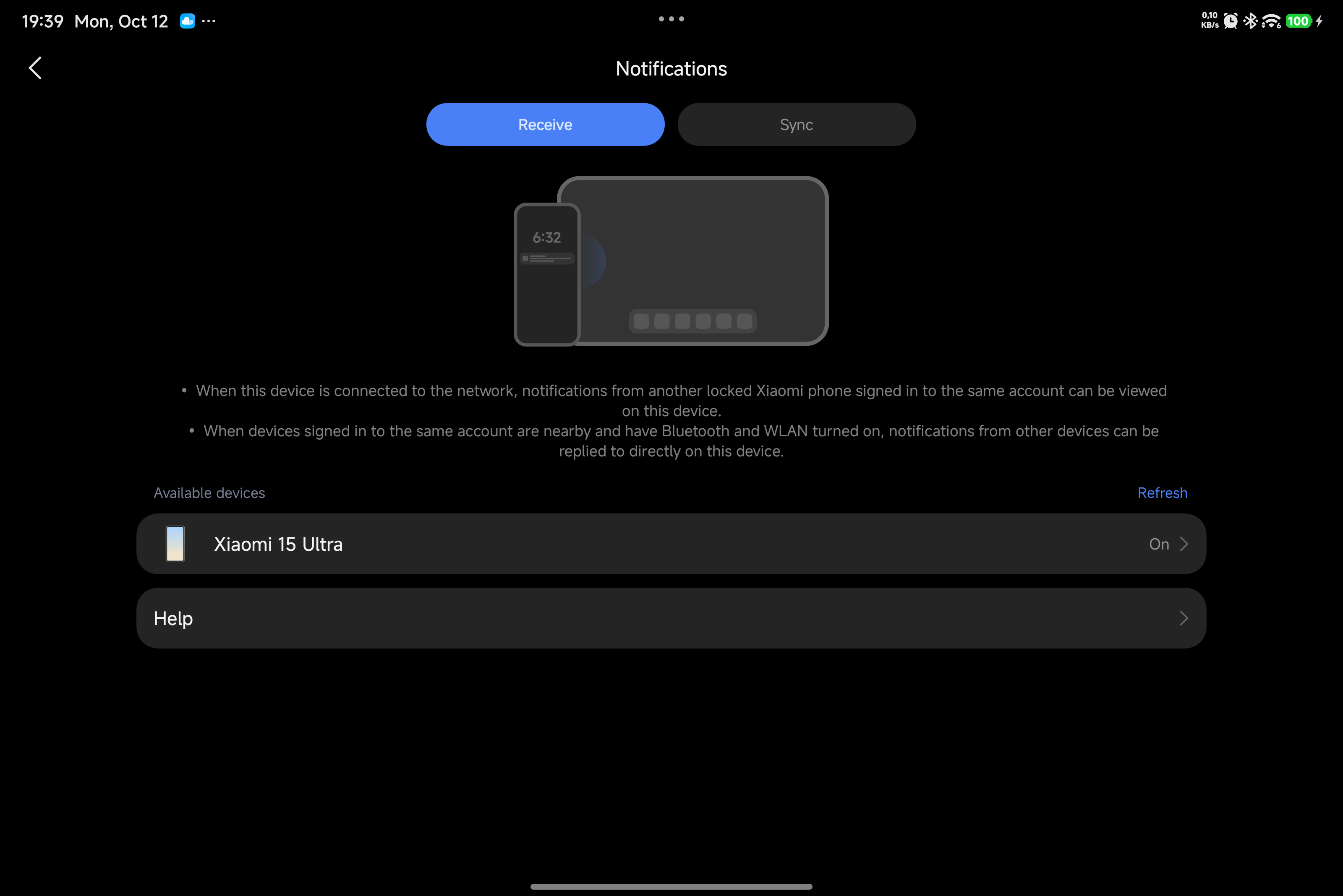
- The China tablet ROM hides the Receive tab, where you choose which phone and which apps to receive notifications from.
- It only works with Xiaomi accounts registered in China.
XNotify removes all three.
- ✅ Every app: Telegram, WhatsApp, Instagram, SMS, calls and anything else installed on the phone.
- ✅ Receive tab unlocked: Settings → Interconnectivity → Notifications now shows the Receive tab on the tablet.
- ✅ App picker with icons: The phone sends its app list and icons to the tablet. After installing new apps, tap the refresh icon at the top right.
- ✅ Search and turn all off: Find an app by typing its name, or turn every app off with one tap.
- ✅ Clear notifications: Big app icon; the title shows the source device and the app name.
- ✅ Pop-ups: Notifications pop up on the tablet screen, even while you watch a video.
- ✅ Works while you use the phone, not only when it is locked.
- ✅ Any Xiaomi account region: EU, US, UA and other non-China accounts work on China ROMs.
- ✅ No duplicates: Apps that are also installed on the tablet are skipped.
- Languages: English, Türkçe, Русский, Español, 简体中文
| Receive tab on the tablet | Every phone app, with icons |
|---|---|
 |
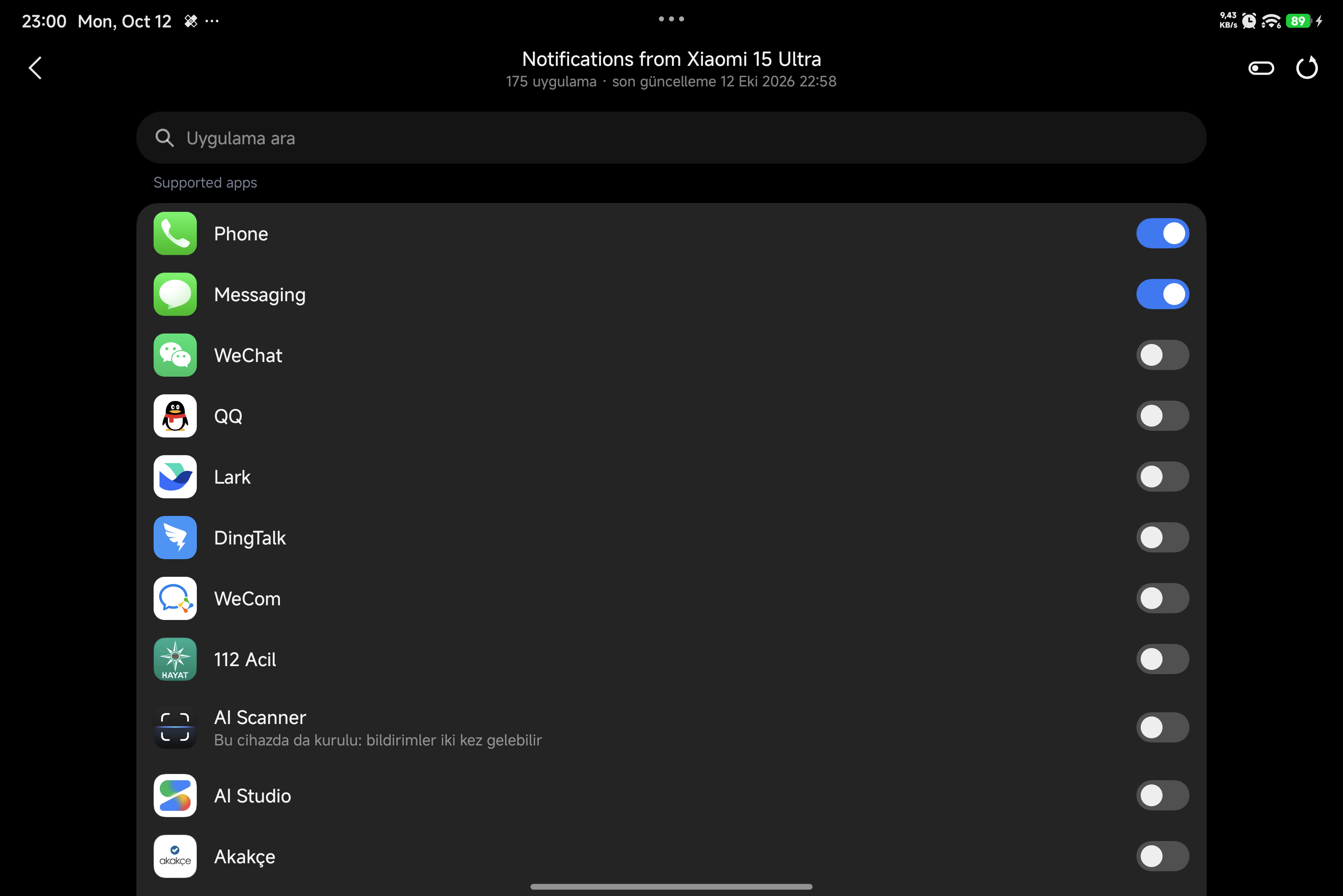 |
The tablet's system language is Turkish, so the lines XNotify adds are in Turkish; Xiaomi's own screen has no Turkish translation and stays in English.
- A Xiaomi phone and a Xiaomi tablet on the HyperOS 4 China ROM (Android 17)
- Both signed in to the same Xiaomi account, with Wi-Fi and Bluetooth on
- Root (KernelSU, SukiSU or Magisk) and LSPosed (API 102) on both devices
Tested on Xiaomi 15 Ultra + Xiaomi Pad 8 Pro, and REDMI K90 Pro Max + Xiaomi Pad.
- Install XNotify on both the phone and the tablet.
- Enable it in LSPosed. The scope is
com.milink.service(Interconnectivity) and System UI. - Reboot both devices.
- On the tablet, open Settings → Interconnectivity → Notifications → Receive, tap your phone and turn on the apps you want.
XNotify has no app icon or settings screen of its own. Everything is controlled from the tablet's notification settings.
- Source: https://github.com/Leekin2/XNotify (GPL-3.0)
- Telegram channel: https://t.me/xioamifetiscisi
- Feedback and suggestions: @emcleek
Xiaomi telefonunuzdaki tüm uygulamaların bildirimlerini Xiaomi tabletinizde görün. HyperOS 4 Çin ROM'u için bir LSPosed modülü.
HyperOS telefon bildirimlerini tablette gösterebiliyor, ama üç sınırı var:
- Yalnızca birkaç Çin uygulaması destekleniyor (WeChat, QQ, DingTalk…).
- Çin tablet ROM'u Al (Receive) sekmesini gizliyor. Hangi telefondan ve hangi uygulamalardan bildirim alacağınızı bu sekmede seçiyorsunuz.
- Sadece Çin'de kayıtlı Xiaomi hesaplarıyla çalışıyor.
XNotify bu üç sınırı da kaldırır.
- ✅ Tüm uygulamalar: Telegram, WhatsApp, Instagram, SMS, aramalar ve telefonda kurulu diğer her şey.
- ✅ Al sekmesi açılır: Tablette Ayarlar → Bağlantı → Bildirimler bölümünde artık Al sekmesi görünür.
- ✅ İkonlu uygulama seçici: Telefon, uygulama listesini ve ikonlarını tablete gönderir. Telefona yeni uygulama kurduktan sonra sağ üstteki yenile simgesine dokunun.
- ✅ Arama ve hepsini kapat: Uygulamayı adını yazarak bulun ya da tek dokunuşla hepsini kapatın.
- ✅ Anlaşılır bildirimler: Büyük uygulama ikonu; başlıkta bildirimin geldiği cihaz ve uygulama adı yazar.
- ✅ Ekranda açılır: Bildirimler tablette ekranın üstünde açılır, video izlerken bile.
- ✅ Telefonu kullanırken de çalışır, sadece kilitliyken değil.
- ✅ Her bölgedeki Xiaomi hesabı: AB, ABD, Ukrayna gibi Çin dışı hesaplar da Çin ROM'unda çalışır.
- ✅ Çift bildirim yok: Tablette de kurulu olan uygulamaların bildirimleri tekrar gösterilmez.
- Diller: English, Türkçe, Русский, Español, 简体中文
| Tablette Al sekmesi | Telefondaki tüm uygulamalar, ikonlarıyla |
|---|---|
|
|
- HyperOS 4 Çin ROM'lu (Android 17) bir Xiaomi telefon ve bir Xiaomi tablet
- İkisi de aynı Xiaomi hesabına giriş yapmış, Wi-Fi ve Bluetooth açık
- İki cihazda da root (KernelSU, SukiSU veya Magisk) ve LSPosed (API 102)
Xiaomi 15 Ultra + Xiaomi Pad 8 Pro ve REDMI K90 Pro Max + Xiaomi Pad üzerinde test edildi.
- XNotify'ı telefona ve tablete kurun.
- LSPosed'da etkinleştirin. Kapsam:
com.milink.service(Bağlantı / Interconnectivity) ve System UI. - İki cihazı da yeniden başlatın.
- Tablette Ayarlar → Bağlantı → Bildirimler → Al bölümünü açın, telefonunuza dokunun ve istediğiniz uygulamaları açın.
XNotify'ın kendi ikonu veya ayar ekranı yoktur. Her şey tabletin bildirim ayarlarından yönetilir.
- Kaynak kod: https://github.com/Leekin2/XNotify (GPL-3.0)
- Telegram kanalı: https://t.me/xioamifetiscisi
- Öneri ve geri bildirim: @emcleek