

PyKeyViewer by Steve28
Version : 1.0
Version 1.0 : 2020.9/29 ~ 2020.10/1 Download
Inspired from : RoanH/KeysPerSecond, Key Viewer made with Java
Overlay Technologies : davidmaamoaix/Overlay, Extend of tkinter with Overlay Method
최신 버전 Newest Version : 1.0 (Download)
- 다운로드를 한 뒤 압축을 해제 합니다. Download the file, and unzip it.
- 안에 있는 Project_Keyboard.exe의 바로가기를 만듭니다.
바로가기를 만드는 이유는 exe 파일이 Utils 파일을 상대적으로 읽기 때문에 두 파일의 위치가 다르면 실행이 불가하기 때문입니다.
Make Shortcut of Project_Keyboard.exe, inside unzipped folder.
Because the exe reads Utils folder relatively, So you can't execute exe file if you change the directory. - 바로가기를 실행시킵니다. Execute the Shortcut.
실행 화면 Run Screen
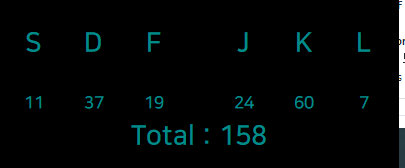
키 입력 감지 Key Input Detection : Default
전역 후킹을 통해 어디서든 키보드 입력을 감지합니다.
Detect Keyboard Input Anywhere by using Global Hook.
오버레이 기능 Overlay Screen : Default
오버레이를 지원합니다. 다른 창을 열어도, 항상 모든 창 위에 있어 가려지지 않습니다.
Support Overlay. Even if you open new window, it always not obscured by any window.
키 정보 세이브 로드 Save and Load of Key Info : Ctrl+C (Load), Ctrl+S (Save)
어느 키를 치면 그 키의 스탯이 1 증가합니다. 키 배치, 종료를 바꿀 수도 있습니다. *.pkvstat 형식으로 저장하고 불러올 수 있습니다.
If you press a key, Stat of the key increased by 1. You can rearrange or change keys. Save and load Stats, using *.pkvstat format.
합산 기능 Total Function : Default
스탯을 모두 합산한 토탈 값을 보여줍니다.
Visualize sum of your stats.
키 바꾸기 Change Key : Button Click
최초 프로그램 실행 시 키 정보는 SDFJKL 입니다. 키 종류를 바꿀 수 있습니다.
If you install and execute the Program first, Key info is SDFJKL. You can change the Key infos.
구석에 고정하기 Move to Corner : Right Click
스크린의 가장 가까운 코너로 화면을 이동시킵니다.
Move to nearest corner of Screen.
종료 Exit : Double Click
프로그램을 종료합니다.
Exit the Program.
============================================================================
키 정보 세이브 로드 Save and Load Key info :(Merged with Save and Load of Key Info)
설정한 키 정보를 저장하고 불러올 수 있습니다.
You can save and load your key infos.