

The OpenCode AI coding agent — natively inside Visual Studio.
Formerly OpenCode Studio. A fast, self-contained tool window with a settings/import wizard and shared chat history.


Important
Renamed: OpenCode Studio → OpenCode Jesk. This is the same extension under a new name, and it stays fully compatible — your settings, providers, credentials and chat history are kept. OpenCode Studio support ends on 20.10.2026. Please switch to the new OpenCode Jesk on the Visual Studio Marketplace.
Tip
One environment, everywhere. OpenCode Jesk shares the same data as the OpenCode CLI and desktop app — your providers, settings, credentials and every chat are already there. No setup, no duplication.
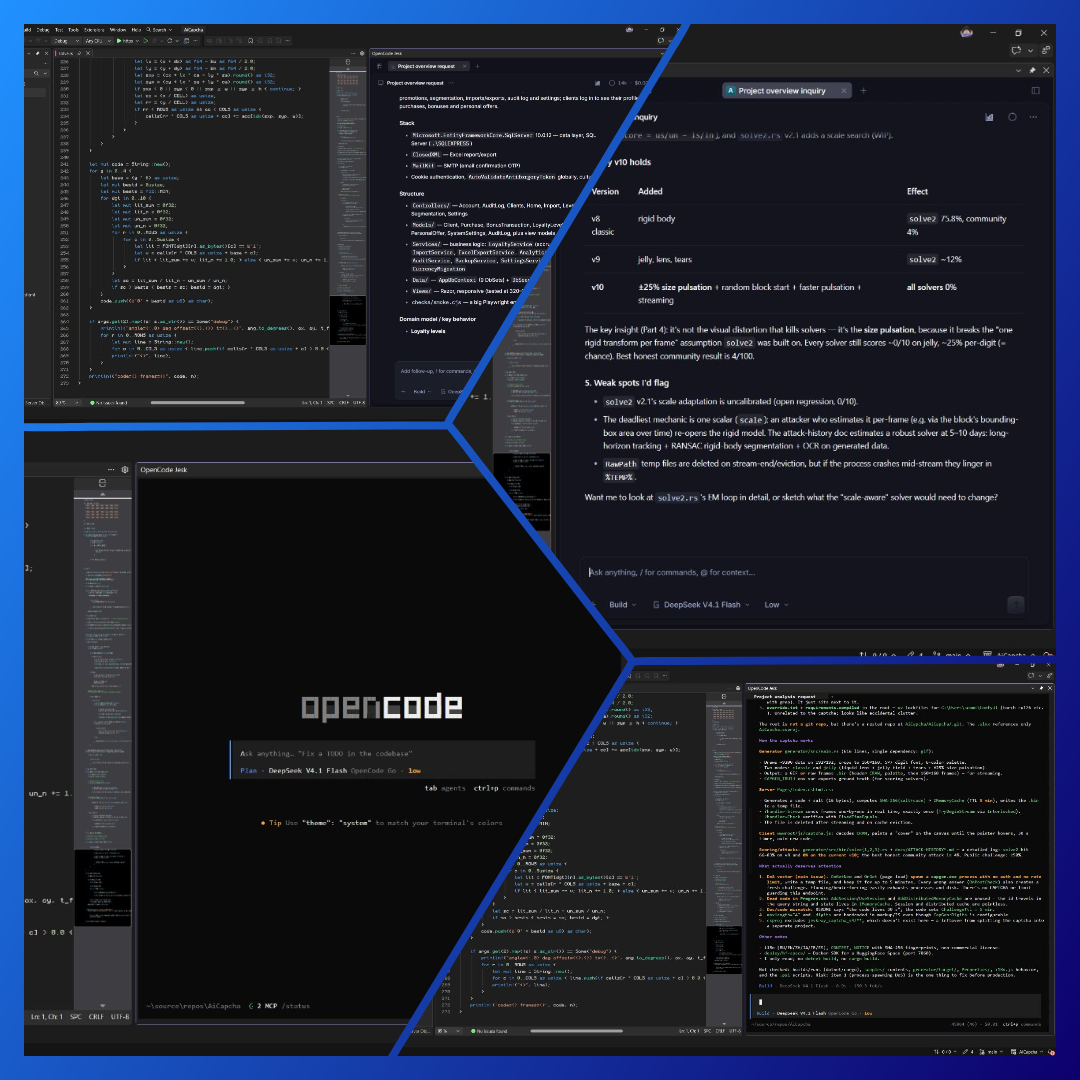 OpenCode Jesk — all panel versions.
- 2.0.0.0 - The big one: Quick Start, Sponsorship, Updates, a full rebrand and a deep refactor.
- Quick Start tab (opens on first run) — a one-page guide, zero to a running agent:
- Install All installs v2 then v1 (both CLIs side by side) with a live npm log.
- A non-linear progress bar (real percentage + elapsed time, sweeping shimmer, rounded corners).
- Cancel aborts a running install; on success the bar turns green with Download complete.
- Version choice (v1 stable / v2 preview), a Desktop (Web) / CLI mode picker with an open-panel button, and an Overview map (extension, data dir, server, logs).
- Sponsorship / Contacts tab — a thank-you note, contacts (Telegram / Email / Boosty / GitHub) and TON / BTC / ETH crypto wallets with QR codes, sub-tabs, an address field and a Copy button.
- Updates tab — a leave-a-review card, a one-time rating popup (once per session, ~2 h, toggle in Settings) and a detailed "What's new" changelog instead of the raw install log.
- UI and brand — a blue palette matched to the icon (gradients, soft glows), the extension icon in the menu and the Settings title, and always-dark windows.
- Full rebrand to OpenCode Jesk — single brand, old name removed entirely: namespace, assembly, package class, VSCT tables and icons renamed; data dir
%LOCALAPPDATA%\OpenCodeJesk(with migration), envOPENCODEJESK_OPENCODE_BIN, new pack URIs. - Internal refactor — "god" classes split into focused services; dead code removed; sources organized into folders.
- Fixed — v1↔v2 web switching (WebView2 cache), start-time version selection, CLI crash on version switch ("Session not found"), npm install (
--force), bunny rounding and hover styles. - Docs — README (EN/RU) and the Marketplace description in the blue style with new preview and settings collages.
- Quick Start tab (opens on first run) — a one-page guide, zero to a running agent:
- 1.2.0 - Desktop (Web) and CLI (terminal) interface modes in the same panel; shared chat between modes; a dedicated Settings window (General, Terminal, Server, Updates, Import); auto-open on solution open; web zoom; terminal font, size, cursor and scrollback; server port/arguments/idle stop; marketplace update checks; v1 / v2 preview support; safe import with backups; and the rename to OpenCode Jesk.
- 1.1.5.1 (minor hotfix) - More reliable Open Extension Manager action (opens the Visual Studio extension manager, Updates page first); the update window now hides until the next Visual Studio restart on any action, and explains how to turn the notifications off in settings.
- 1.1.5 - Fixed: closing the update window hides it until the next restart; "Open Extension Manager" opens the Visual Studio extension manager.
- 1.1.4 - Background update checks (once a minute). For OpenCode Jesk itself: a compact dark-themed window shows the new version and its release notes with Open Extension Manager / Marketplace page / Not now buttons (Visual Studio already installs extension updates in the background). For OpenCode CLI: the window offers to update it right from the extension (
npm i -g opencode-ai@latest) or shows the manual command; the panel picks up the new version on restart. New setting Check for new versions turns extension update notifications off.
Full changelog: UPDATES.md
| 🧠 | Real OpenCode, not a clone — the complete official web UI, rendered directly in Visual Studio. |
| 🔄 | Shared history — the same chats as the CLI and desktop app, across every Visual Studio window. |
| 🗂️ | Current project by default — new-chat view selects the open Visual Studio solution/repository; other projects and chats remain accessible. |
| ⌨️ | Desktop / CLI — the Web panel, or a plain terminal with OpenCode already running inside the same panel, for both v1 and v2 preview. |
| 📈 | Profile & usage in one click — the statistics button opens your OpenCode console inside the panel, so you can check real spend and limits without switching to a browser. |
| 📥 | Settings & import wizard — import settings, themes, credentials and history in one click. |
| 🔁 | Auto-reconnect — recovers the session by itself if the server drops. |
| 🔒 | Local-first — loopback only, zero telemetry. |
| 🪶 | Lightweight — one VSIX for Visual Studio 2022 and 2026. |
- ⚙️ Update check toggle - turn update notifications on or off in settings.
Choose Desktop (Web) or CLI in Settings → Settings → Interface. The mode selector is only in settings, not in the panel. The Use OpenCode v2.x (preview) option is independent and applies to both modes.
Desktop keeps the existing WebView2 integration. CLI shows a plain terminal with OpenCode already running — no Visual Studio terminal chrome, no extra UI, just the terminal and the agent. It lives in the same OpenCode Jesk panel, so Visual Studio keeps its docked position and size, and it starts automatically in the project directory.
Both modes connect to the same server. Switching from Web to CLI can continue the selected chat. History remains within the selected OpenCode version — v1/v2 database formats are not converted automatically. Opening Jesk defaults the new-chat view to the solution's Git root, or the solution directory if there is no repository.
Verification: build Release, then run tests\Run-TerminalSmoke.ps1. The check uses isolated test data and covers the terminal (ConPTY), v1/v2 shared sessions, and terminal rendering in WebView2.
  View   →  Other Windows  →  OpenCode Jesk          🔹 the agent
  Tools  →  OpenCode Jesk Settings                   📥 setup wizard
Note
Requirement: the OpenCode CLI must be installed and available on your PATH.
📦 Installation
From the Visual Studio Marketplace (recommended)
- In Visual Studio open Extensions → Manage Extensions.
- Search for OpenCode Jesk and install it.
- Restart Visual Studio.
From a VSIX
- Download the latest
OpenCodeJesk-x.y.z.vsixfrom Releases. - Close all Visual Studio instances and double-click the file.
OpenCode stores every session against the project directory it was created in. Because OpenCode Jesk shares the same data as the CLI and desktop app, all chats are already available — but grouped by project path.
Important
If a project lives at a different absolute path than when its chats were created (another drive, another user name, a moved or renamed folder), those sessions stay under the original path. Line up the project paths and everything synchronizes.
- Open each project at the same absolute path it originally used — e.g.
C:\Users\<you>\source\repos\MyApp. - If the path changed, move the project back, or import the old data via Tools → OpenCode Jesk Settings pointing at the folder with the original
opencode.db. - Reopen the tool window — the sessions appear under the matching project.
Once the paths match, all chats sync between the CLI, the desktop app and every Visual Studio window. 🎉
Statistics are not part of this release yet. Use the statistics button in the OpenCode panel to open the OpenCode Console (usage and limits) directly.
OpenCode Jesk keeps a deliberately small, decoupled core.
 ┌──────────────────────────────────────────────────────────────┐
 │  OpenCodeJeskPackage            VS package & commands      │
 ├──────────────────────────────────────────────────────────────┤
 │  ServerController                server + session lifecycle  │
 │    ├── OpenCodeServerService      launches `opencode serve`  │
 │    ├── OpenCodeSessionService     /session, /project API     │
 │    ├── ConnectionMonitor          periodic health checks     │
 │    └── ProcessBinding             dies with Visual Studio    │
 ├──────────────────────────────────────────────────────────────┤
 │  OpenCodeToolWindowControl        WebView2 host              │
 │    └── opens http://127.0.0.1:<port>/ (the web UI home)      │
 ├──────────────────────────────────────────────────────────────┤
 │  SettingsWindow / ImportService   settings & import wizard   │
 │    └── OpenCodeEnvironment / Log                             │
 └──────────────────────────────────────────────────────────────в”
Tip
Design principles
- No proxy layer — WebView2 talks to the real server origin, so the UI is authentic and update-proof.
- Shared data — runs in your default environment, in sync with the CLI and desktop app.
- One server per machine — every Visual Studio window reuses the same OpenCode server.
- Local by default — loopback only, no outbound calls except your providers.
| Component | Version |
|---|---|
| 🖥️ Visual Studio | 2022 and 2026 |
| ⚡ OpenCode CLI | v1 and v2 (beta), installed and on PATH |
| 🛠️ .NET SDK (build from source) | .NET 10 |
| 🌐 WebView2 Runtime | bundled with Windows 10/11 and VS |
git clone https://github.com/Jevkray/OpenCodeJesk.git
cd OpenCodeJesk
dotnet build vs/OpenCodeJesk.csproj -c Release
The VSIX is produced at vs/bin/Release/net472/OpenCodeJesk.vsix. For a debug run, open OpenCodeJesk.sln and press F5 to launch the experimental instance. 🧪
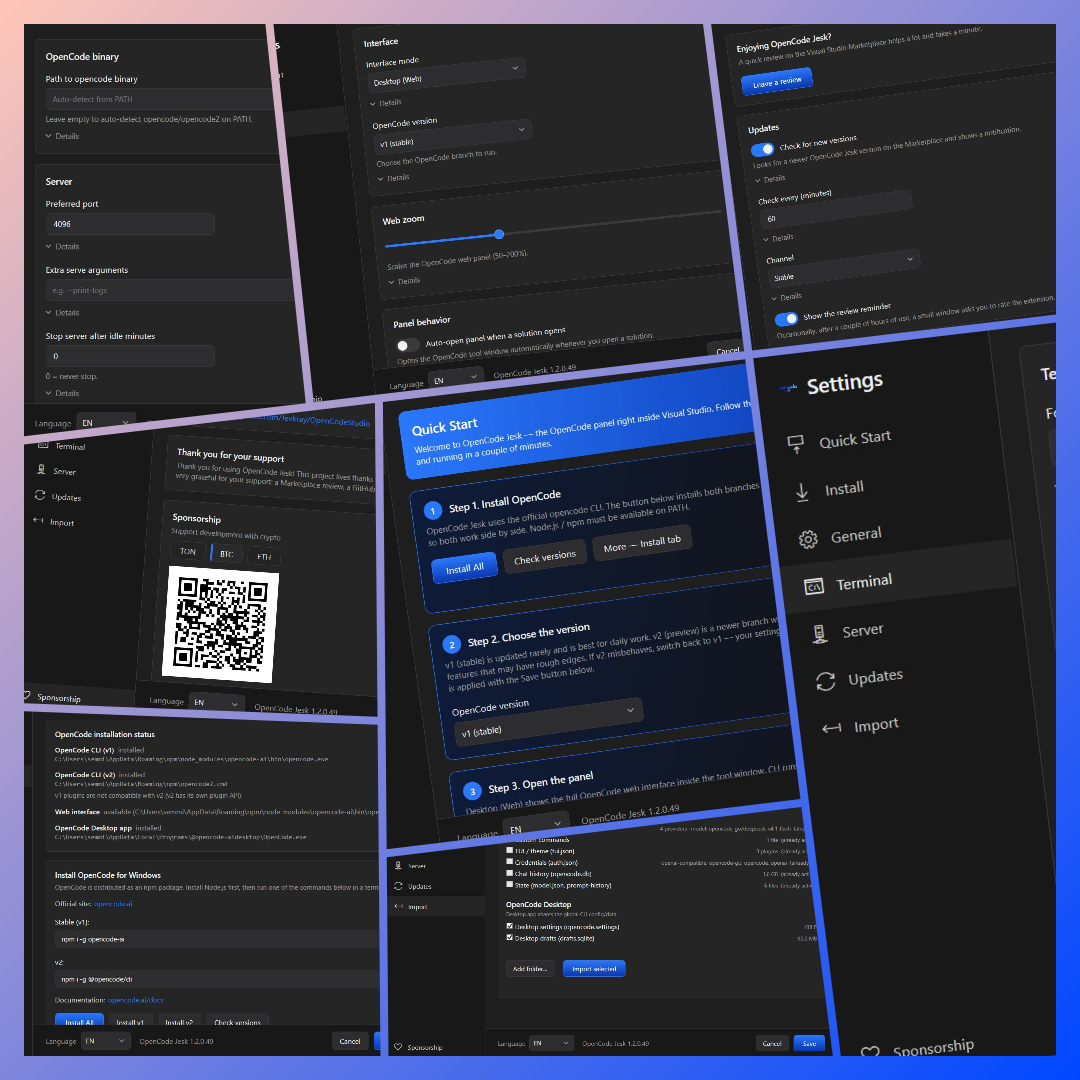 Settings: all tabs.
- 🖧 the server binds to
127.0.0.1only - 🔑 credentials are stored by OpenCode itself in your own environment
- 🚫 no telemetry, no analytics
- 📈 the usage overlay signs in to the OpenCode Console and reads your usage and limits from
opencode.aiusing your own session cookie (stored encrypted with DPAPI) — no other data leaves your machine.


Full changelog: UPDATES.md
Released under the MIT License.