

An end-to-end encrypted cloud drive with deniable hidden drives, unlocked by a FIDO2 security key (YubiKey etc.) and a drive PIN.
A security key can be tied to any number of usernames. Each username is tied to a vault of x fixed-size drives, opened by slot number and drive PIN. An uninitialized slot is indistinguishable from a used slot without both its security key and drive PIN, so the existence of data in a given drive slot cannot be proven (and by extension, knowledge/the existence of the drive PIN).
The adversary has:
- one snapshot of an honest server;
- the user's security key;
- any information they can prove the user to know, such as the security key's PIN.
The adversary cannot:
- determine how many drives are in use or prove that a hidden drive exists;
- find other usernames on the key, except by offline Argon2id guessing per username;
- read names, sizes, counts or contents, or recover deleted files with a coerced drive PIN;
- guess drive PINs without one physical key touch per guess.
- Keys derive from the security key's hmac-secret / WebAuthn PRF output (256 random bits, released after the key's PIN). The drive PIN is part of the PRF salt, so each guess needs a key touch.
- Encryption is client-side. The server stores one encrypted credential record per username and one preallocated file per vault, filled with random bytes at creation. It stores no names, sizes, counts or timestamps.
- A slot is 1024 blocks of 256 KiB. Used and unused slots are both random. A used slot has two 16 KiB header copies: key entries that wrap the drive key, and a sealed body. The file tree is one encrypted document; each file has its own random key.
- Commits are copy-on-write. Old metadata is overwritten with random bytes.
- API traffic is sealed in a channel keyed from the security key, independent of TLS.
Design, formats and limits: docs/deniable-drives.md.
The threat model assumes the adversary gets the server and the security key with its PIN at one point in time, and can coerce anything they can prove you know. Given that snapshot, Strongbox tries to make other hidden drives impossible to prove. That helps against an adversary who can only compel information they know exists, such as under legal compulsion: they cannot prove a hidden drive exists, so there is nothing to compel. The claims depend on the assumptions and limits in the deniable-drive design. This famous shows the problem.
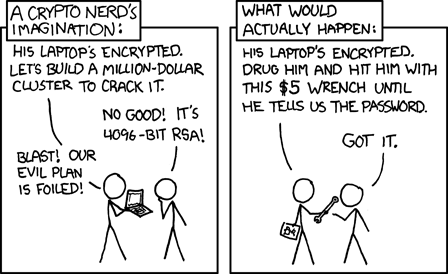
Security, xkcd #538 by Randall Munroe, used under CC BY-NC 2.5.


Blue: other accounts on the same key, and the sealed transport. Yellow: vault existence. Red: the attack each design choice mitigates (dotted edges). Sign-up and the username record lookup are the only calls in the clear; sign-up must happen on a network you trust.
flowchart TD
  subgraph flow["Account to drive flow"]
    U["Username (secret)"] -->|"Argon2id, 64 MiB per guess"| L["Lookup id"]
    L -->|"encrypted record, or a stable same-size decoy"| K["Security key + PIN<br/>non-discoverable credential, credProtect 3"]
    K -->|"touch 1: seeded vault salt → 256-bit PRF"| C["Sealed channel<br/>transport key from the PRF, AEAD + counters"]
    C -->|"challenge + Ed25519 login, all sealed"| V["Vault login"]
    V -->|"slot i + drive PIN"| K2["Security key touch 2: drive_salt(i, PIN)"]
    K2 -->|"read slot i's two 16 KiB header copies"| H["Fixed-size header<br/>entries + sealed body, rest of block filler"]
    H -->|"an entry opens"| O["Drive opened<br/>batched commits wipe old metadata"]
    H -->|"wrong PIN or unused slot"| N["Same 'No drive found' error"]
    S["Vault: 100 slots, all random from creation<br/>(spares pre-filled the same way)"] -.-> H
    O -->|"stored as"| B["Fixed-size sealed blocks<br/>names, tree, sizes inside encrypted metadata;<br/>each file block bound to a fresh file key, slot, block and index"]
  end

  subgraph online["Online attacker"]
    T1["Probe which usernames exist"]
  end
  subgraph seized["Seized server only"]
    T2["Offline brute force of the unlock secret"]
    T3["Read file names, sizes, counts"]
  end
  subgraph coerced["Seized server + key + PIN"]
    T4["Find other usernames on the key"]
    T5["Prove hidden drives exist"]
    T6["Brute-force drive PINs offline"]
    T7["Recover deleted files with a coerced drive PIN"]
  end
  subgraph keyonly["Key + PIN only"]
    T8["List accounts on the key"]
  end
  subgraph network["Hostile proxy or forged TLS certificate"]
    T9["Read tokens, paths, blocks"]
    T10["Forge, replay or reorder requests; impersonate the server"]
    T11["Reuse one server's login or channel keys on another"]
  end

  L -.->|mitigates| T1
  K -.->|mitigates| T2
  B -.->|mitigates| T3
  U -.->|mitigates| T4
  S -.->|mitigates| T5
  N -.->|mitigates| T5
  H -.->|mitigates| T5
  K2 -.->|mitigates| T6
  O -.->|mitigates| T7
  K -.->|mitigates| T8
  C -.->|mitigates| T9
  C -.->|mitigates| T10
  S2["Per-account random seed in the sealed record"] -.->|mitigates| T11

  classDef account fill:#d1ecf1,stroke:#0c5460,color:#000
  classDef vault fill:#fff3cd,stroke:#b58900,color:#000
  classDef threat fill:#f8d7da,stroke:#721c24,color:#000
  class L,K,C account
  class N,S,S2,H vault
  class T1,T2,T3,T4,T5,T6,T7,T8,T9,T10,T11 threat
- Specific account name existence: not deniable. Registration reveals whether a username is taken, so anyone who can try names can confirm that an account exists.
- Other accounts on the same key: Deniable, under two threat models.
- Seized server, plus key and PIN: the attacker has the server snapshot. The server stores no usernames, only Argon2id-derived lookup ids and records encrypted under keys derived from the username. Matching the key means guessing usernames offline: for each candidate, one Argon2id run (64 MiB), decrypt the record to get its credential ids, then test them on the key (one touch per attempt).The credentials are non-discoverable, so the key lists nothing.
- Key and PIN only, no server access: the attacker cannot match the key to any account. The credentials are non-discoverable, so the key lists nothing, and without the records there are no credential ids to test.
- Vault existence: Deniable, a wrong drive PIN and an unused slot give the same result, message and timing, and every slot is filled with random bytes at creation, so used and unused slots look alike.
| Path | What |
|---|---|
crates/core |
Client-side crypto: AEAD and key derivation, vault and drive formats |
crates/proto |
HTTP API wire types (everything the server ever sees) |
crates/fido |
PRF access: Windows WebAuthn API, CTAP2-HID (Linux/macOS), test-only software key |
crates/client |
Client library and the sbox CLI |
crates/server |
strongbox-server: blind storage server (axum, SQLite, /v2 vault slot store) |
apps/desktop |
Tauri desktop app (Rust core plus a dependency-free HTML/JS UI) |
docs/ |
deniable drives (design and crypto), server plan |
deploy/ |
Caddyfile, Dockerfile, systemd unit |
On Windows, double-click start-server.bat (open registration on http://127.0.0.1:8080; the first
start asks for the network interface (a list), the server port and the admin page port; data in strongbox-data\, a small vault layout; extra arguments such as --debug are passed
through, and every default can be overridden with the matching STRONGBOX_* environment
variable), then start-client.bat for the desktop app. reset-server.bat permanently
deletes that server data directory after an explicit confirmation. start-client.bat --soft uses the
insecure software key, to try the UI without a security key. Or by hand:
# 1. Server (open registration for local testing). Logging is privacy-preserving by default;
#    add --debug (or STRONGBOX_DEBUG=true) for request traces and full error details.
cargo run -p strongbox-server -- --registration open

# 2a. CLI: insert your security key (it must have a PIN set)
cargo run -p strongbox-client --bin sbox -- create --server http://127.0.0.1:8080
cargo run -p strongbox-client --bin sbox -- open --server http://127.0.0.1:8080 3

# 2b. Desktop app
cargo run -p strongbox-desktopWith --registration invite, an account needs an invite code: the shared --invite-token, or a
code created on the admin page. The page has its own port (--admin-listen, default
http://127.0.0.1:4444/); open it in a browser on the server machine. There you can create and delete standard codes (valid for any number of
accounts until deleted; you may pick the text) and single-use codes (generated, and removed the
moment they admit one account; a failed sign-up does not spend them). It also shows:
- Problems that need attention: open registration, debug logging, low disk space, accounts whose vault files are missing, and sustained high CPU.
- Live machine graphs: CPU, memory, the server's I/O and network traffic. They cover the last 15 minutes and are kept in memory only.
- Capacity: free disk, how many more accounts fit, Strongbox's own disk use and spare vaults.
- Accounts and configuration: account, key and session counts, and the settings in effect.
The server cannot see names, files or how much of a vault holds data, so none of that is shown.
The page has no login of its own. It is a separate listener that must be a loopback address, and it
is served only to a browser on the same machine: requests that come through a proxy (forwarded
headers), arrive over a non-loopback connection or carry a foreign Host get a 404, so the TLS
proxy in deploy/ never exposes it. On a remote server, reach it
through an SSH tunnel (ssh -L 4444:127.0.0.1:4444 host).
Every vault is allocated and filled with random bytes in full when it is created
(--vault-slots × --vault-slot-blocks × 256 KiB; the defaults are 100 × 1024, i.e. 25 GiB
per vault). Use a small layout for local testing; all vaults on a server share one layout.
The server keeps --spare-vaults (default 1) vaults filled in advance so sign-up does not
wait for the fill; each spare takes one vault's worth of disk (0 turns this off).
cargo run -p strongbox-server -- --registration open --vault-slots 100 --vault-slot-blocks 16The username and drive PIN are asked for at hidden prompts (never on the command line). Choose a username nobody could guess: it works like a password. Drive PINs need at least 8 characters; 10+ digits or a passphrase is recommended. Nothing about vaults is stored on the computer or the security key.
The desktop client creates an account, signs in with a key, creates a vault, opens or resets a slot, adds another security key, and deletes the account. It also has drag-and-drop upload of files and folders (onto the window or onto a specific folder), drag-to-move, multi-select, vault-wide search, in-app preview (images, PDF, audio, video, text) decrypted in memory, replace/keep-both on name clashes, cancellable parallel transfers, folder download, idle auto-lock, an optional panic key (1–3 keys held together, set in Account security; off by default) that instantly locks and securely wipes all keys from memory, and light/dark themes. Vaults have no trash: deletion is permanent.
Plain http:// is accepted only for localhost. Real deployments go behind TLS (see deploy/).
TLS is treated as optional protection. After sign-up, every API call is sealed in an
end-to-end encrypted, authenticated channel keyed by a per-key transport_key derived from the
security key's PRF output, so a hostile HTTP/SOCKS proxy, or a forged TLS
certificate, sees only ciphertext and cannot read, alter, replay or answer requests (it can
drop or delay them). Nothing is
pinned or stored on the computer. Sign up on a network you trust: sign-up (and the
username record lookup) are the only calls in the clear, and sign-up carries the transport key.
Still visible to a network observer: IP addresses, timing and message sizes. Details and limits: deniable-drives.md §8.1.
Without a security key, for UI development only, build with the insecure software authenticator and point it at a state file:
STRONGBOX_SOFT_AUTHENTICATOR=/tmp/softkey.json cargo run -p strongbox-desktop --features dev-soft-authenticator| Platform | Backend | Notes |
|---|---|---|
| Windows 11 22H2+ | webauthn.dll |
No admin rights needed; the PIN is entered in the Windows dialog |
| Linux, macOS | CTAP2 over USB HID (authenticator crate) |
PIN prompted by Strongbox; on Linux needs udev access to hidraw |
All backends use WebAuthn PRF semantics, so a credential enrolled on one platform should unlock on the others.
cargo test --workspacecrates/client/tests/vault_e2e.rs runs a real server and client with the software
authenticator: two usernames on one key, decoy and hidden drives, wrong PIN vs unused slot,
backup keys, account deletion, and the seized-server view (one same-size file per vault,
no plaintext, no usernames).
crates/client/tests/transport.rs checks that the client never follows redirects and refuses
plain HTTP to remote hosts. crates/client/tests/hostile_proxy.rs puts a recording, tampering
proxy between client and server: nothing but ciphertext crosses it, and replayed, forged,
tampered and impersonated messages are refused.
- FidoVault: a reference for Strongbox's multi-authenticator design.
- Deniable encryption: Made me go down this rabbithole.
MIT. See COPYING.
The design and implementation decisions (and other bad ideas), are mine. Most of the code was generated by AI as a quick experiment.