Interactive schematic viewer for najaeda netlists: the naja-schematic WASM viewer, packaged with the Python backend that answers it from a live najaeda netlist.
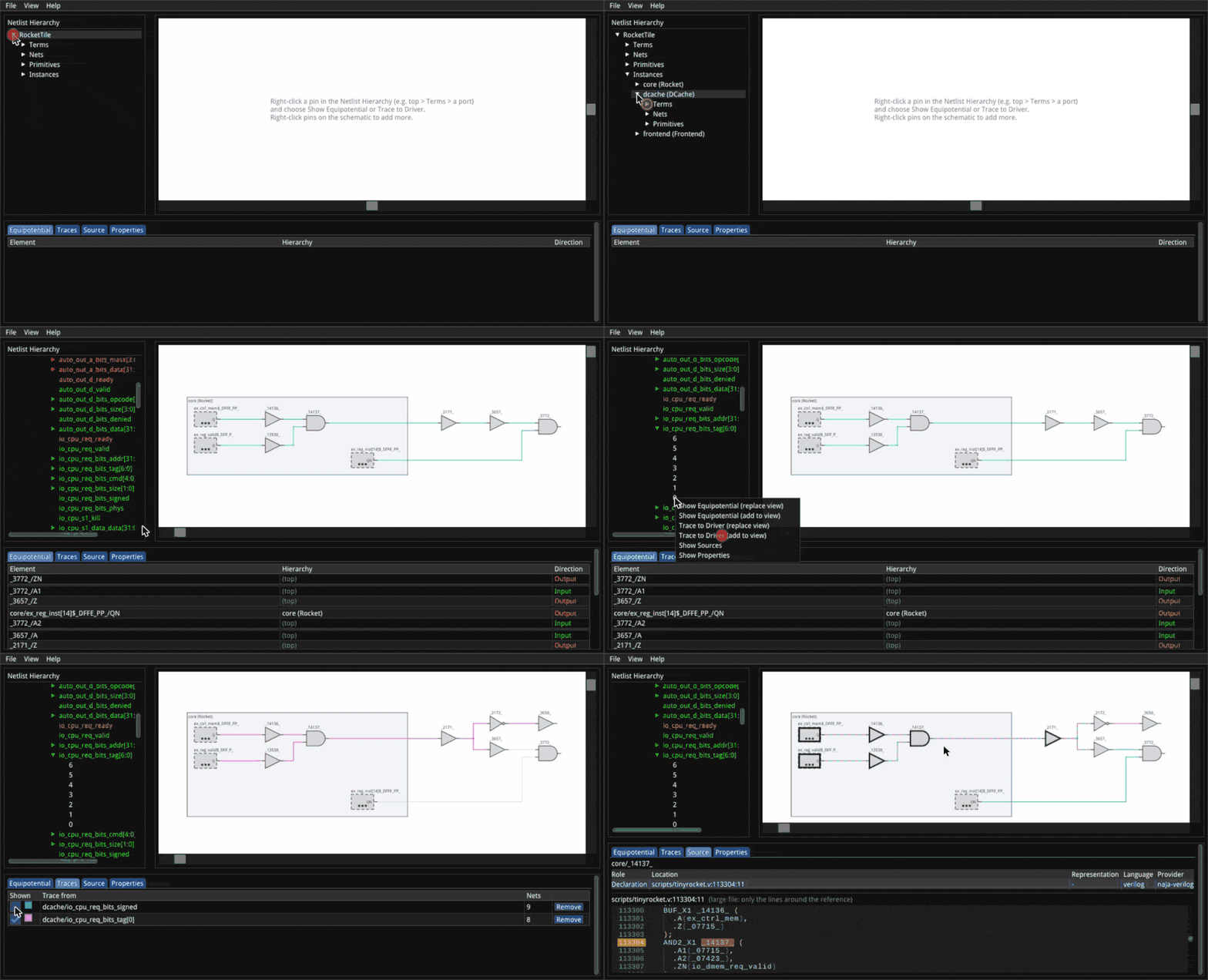
pip install naja-schematicMouse and keyboard controls are listed in the main README and in the viewer under Help > Keyboard Shortcuts.
Try it in Colab: a walkthrough of every widget feature below, runnable as is. Then a real design: a RISC-V core.
from najaeda import netlist
import naja_schematic

netlist.load_primitives("xilinx")
top = netlist.load_gate_level_verilog("design.v")

naja_schematic.show()          # interactive view in the cell output
The view is answered from the netlist in the running kernel, so it shows
the design as the notebook has built or edited it so far; call show()
again after an edit for a fresh view. Diagnoses (e.g. from a formal
equivalence check) can be overlaid:
view = naja_schematic.show()
view.annotate([{"kind": "instance", "path": ["u_sub"], "severity": "error",
                "message": "not equivalent", "source": "kepler-formal"}])
view
Nets, instances and pins can also be styled -- a color and width for a
net's wires, a fill for a box, labels -- kept across reloads and in SVG
exports. A "net" item colors the whole net through the pin it names;
"target" takes anything show_instance()/show_net() take, and also
the text forms of naja-schematic render's --instance/--net
("u1/u2", "drv_0:O", "en" for a top-level port):
view.style([
    {"kind": "net", "target": ([], "en"), "color": "#ff7f0e", "width": 3, "label": "en"},
    {"kind": "net", "target": "drv_0:O", "color": "#1f77b4"},
    {"kind": "instance", "target": ["s0"], "fill": "#1f77b455"},  # a tint
])
Diagnosis colors win over styles, and styles over trace colors.
The same items, in a JSON file, are what --style FILE reads (on
naja-schematic and naja-schematic render). JSON has no tuples: a pin
there is text, a list [instance, terminal] / [instance, terminal, bit] ([] = a top-level port), or {"path": [...], "terminal": ..., "bit": ...}:
{"items": [
  {"kind": "net", "target": [[], "en"], "color": "#ff7f0e", "width": 3, "label": "en"},
  {"kind": "net", "target": "drv_0:O", "color": "#1f77b4", "width": 2.5},
  {"kind": "net", "target": [["u_core", "u_alu"], "A", 3], "color": "#2ca02c"},
  {"kind": "instance", "target": "u_core/u_alu", "fill": "#2ca02c55", "label": "ALU"},
  {"kind": "term", "path": ["s0"], "terminal": "CE", "color": "#d62728"}
]}
kind is "net", "instance" (the default) or "term". Instead of
target, an item can give path (instance names, [] = the top) or
id_path (instance ids), plus terminal/term_id and bit for a pin.
The style fields are color ("#rrggbb"/"#rrggbbaa"), width,
fill and label. Text is matched against the design. Text that names
nothing, or more than one object, is an error. So is any item that
doesn't resolve, and then nothing is drawn. See Style
files for details.
The view and your najaeda code can point each other at instances.
show_instance() takes a najaeda Instance or a naja SNLPath, a list
of instance ids (as Instance.pathIDs) or a list of instance names (a plain string is one
name, never split on /, since escaped names can contain it). Anonymous
instances have no name to go by: reach them with an Instance or ids. The viewer opens its tree down to that instance, selects it, and
draws it alone in the schematic. Each pin there is open, so you can click
one to add its net and grow the schematic from the instance. In the other
direction, the instance selected in the viewer (click it in the tree or the
schematic) is available as a naja SNLPath (najaeda's raw API), and its
ids, which give the najaeda Instance, as selected_id_path:
view.show_instance(netlist.get_instance_by_path(["u_sub", "u_and"]))
view.show_instance(["u_sub", "u_and"]) # same thing

view.show_net(netlist.get_instance_by_path(["u_sub", "u_and"]).get_term("O"),
              color="#ff8800")         # its net, as a colored trace
view.show_net((["u_sub"], "y"))        # (instance, terminal[, bit]) works too

path = view.selected                   # what the user clicked (an SNLPath), or None
path.getModel().getName()
inst = netlist.Instance(view.selected_id_path)

view.on_select(lambda path: print("selected", path))
naja_schematic.show(inst) (or show(["u_sub", "u_and"])) starts a new
view on it. After editing or reloading the design in later cells,
view.design_changed() refreshes an existing view in place.
naja-schematic --verilog design.v --liberty cells.lib --open
naja-schematic --sv top.sv --top top --diagnosis report.json --open
serves the viewer page and its WebSocket on http://localhost:8081/ and
opens it in a browser. --stdio speaks the same protocol as JSON lines on
stdin/stdout instead, for a host (e.g. an editor extension) that relays
messages itself. naja-schematic --help lists every option.
--py-primitives prims.py (repeatable) loads primitives defined in
Python before the design: a .py file, or an importable module, whose
load(db) creates them on the design's NLDB (as
najaeda.primitives.xilinx does for --xilinx).
export_svg() draws part of the design loaded in najaeda as an SVG
schematic, with no browser and no display (e.g. in CI). export_png()
makes the same drawing as a PNG image:
import naja_schematic
from najaeda import netlist

top = netlist.load_gate_level_verilog("design.v")
naja_schematic.export_svg(
    [top.get_child_instance("u1")],                 # instances: boxes with every pin
    "cone.svg",
    nets=[top.get_term("y")],                       # nets, each a colored trace
    traces=[(["u1"], "D")],                         # fan-in cones, back to flops and ports
    style=[{"kind": "net", "target": top.get_term("y"), "color": "#ff7f0e"}],  # as view.style()
)
png = naja_schematic.export_png(top.get_child_instance("u1"), "u1.png",
                                scale=3)                # 3 pixels per SVG pixel, drawn sharp
naja_schematic.export_svg(
    nets=[top.get_term("clk")], path="clk.svg",
    view_options={"instance_label": "both",         # name above each box, cell model under it
                  "max_sinks": 16, "group_by": "model"},  # a net's sinks past 16: "DFF x812"
)
naja_schematic.export_svg(
    traces=[(["u1"], "D")], path="report.svg",
    title="Fan-in of u1/D", caption="after the edit",  # bands above / below the drawing
    legend=True,                                     # a swatch per color drawn
    hide_ui_glyphs=True,                             # no open-pin stubs or "more pins" dots
)
svgs = naja_schematic.export_svgs([                 # several drawings, one renderer
    {"instances": [["u1", "u2"]], "path": "u2.svg"},
    {"traces": [(["u3"], "A", 0)], "path": "u3_a0.svg"},
])
Targets are what show_instance()/show_net() take: najaeda
Instance/Term/Net/Equipotential, naja objects, instance paths as
lists of names or ids, and (instance, terminal[, bit]) pins. One that
doesn't resolve raises ValueError and nothing is drawn. The drawing is
exactly what a viewer showing the same things exports, primitives defined
in Python included. From a shell:
naja-schematic render --verilog design.v --py-primitives prims.py --top top \
  --instance u1/u2 --net u1:A[3] --trace u3:D --net y --style styles.json --svg out.svg \
  --png out.png --scale 3 --instance-label both --max-sinks 16
People can use an export for documentation, reviews or bug reports, and
tools can generate one too: a script, a CI job or an AI agent that has
found something in a netlist can render it and attach the picture to its
report, so a person can check the finding at a glance. For example, the
fan-in cones of two flip-flops in the tinyrocket RISC-V core (in the
repository's scripts/), overlaid:
naja-schematic render --verilog scripts/tinyrocket.v \
  --liberty scripts/NangateOpenCellLibrary_typical.lib scripts/fakeram45_64x32.lib \
  --trace 'core/div.count[0]$_SDFFE_PP0P_:D' --trace 'core/div.req_tag[0]$_DFFE_PP_:D' \
  --title "tinyrocket: fan-in cones of two divider flops" --legend --hide-ui-glyphs \
  --png cones.png --scale 2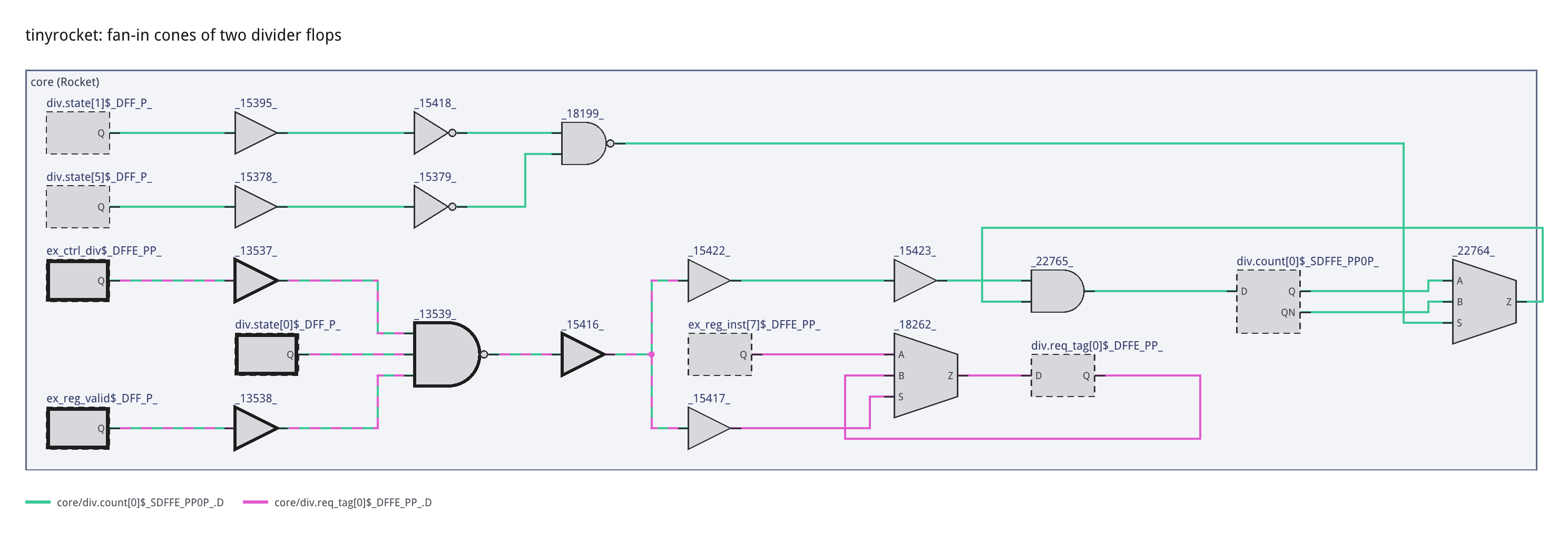
Each cone has its own color. The wires both cones go through are striped in both colors, and the gates they share are outlined.
view_options (and the flags --instance-label, --sink-rows,
--max-sinks, --group-by; for exports only, --title, --caption,
--legend, --hide-ui-glyphs, also export_svg()/export_png()
keywords) set how the schematic is drawn, and the SVG's <g> groups
name every net, instance and port in it: see
How the schematic is drawn. In
a notebook they're show(view_options=...) / view.view_options(...),
and on a server ViewerServer(view_options=...), the same flags on
naja-schematic.
--instance, --net and --trace are repeatable. A pin is INST:TERM,
INST:TERM[BIT], or TERM for a top-level port; an instance path u1/u2
is matched against the design (an escaped name containing / still
works), or given as JSON ('[3,7]' ids, '["u1","u2"]' names; a pin as
'{"id_path":[3,7],"terminal":"A","bit":0}'). It exits non-zero, writing
nothing, if any target doesn't resolve.
The renderer, naja-schematic-render, is a small native program shipped in
the Linux (x86_64, aarch64), macOS and Windows (x64) wheels. Elsewhere,
build it from a checkout
(cmake -S . -B build-render -DNAJA_SCHEMATIC_RENDER_ONLY=ON && cmake --build build-render, a C++ compiler is all it needs) and set
NAJA_SCHEMATIC_RENDER to its path.
A tool that loads and edits the design itself (with najaeda or the raw
naja bindings) can serve the viewer on it without loading anything:
import threading, naja_schematic

design_lock = threading.RLock()   # held by the host while it edits the design
server = naja_schematic.ViewerServer(lock=design_lock)   # port 0: any free port
server.start()
server.open_browser()             # or hand server.url to the user

server.annotate(items)            # diagnosis overlay, kept across reloads
server.style(items)               # colors, widths, fills, labels, kept across reloads
server.show_instance([3, 7])      # instance ids, names, or a najaeda Instance
server.show_net(term, color="#ff8800")  # a net as a colored trace (a najaeda Term, ...)
svg = server.export_svg("view.svg")     # the schematic as SVG, from a viewer
server.show_net(term, trace=True)       # a pin's fan-in cone
server.on_select(lambda id_path, path: print("selected", path))
with server.replacing_design():   # holds design_lock, then viewers reload
    netlist.load_gate_level_verilog("other.v")
server.stop()
Viewer requests are answered on a background thread while lock is held
(or pass run= to answer them on a thread of your choosing). The page's
URL carries a random access token, and other web pages can't connect to
the WebSocket. Once the design is replaced, anything a viewer asked about
or selected in the old one is ignored, even if it arrives late or names
instance ids the new design reuses.
The viewer bundle (naja_schematic/static/naja-schematic.js) is built from
the C++ sources, not checked in. From the repository root:
emcmake cmake -S . -B build-wasm-module -DCMAKE_BUILD_TYPE=Release -DNAJA_SCHEMATIC_WASM_MODULE=ON
cmake --build build-wasm-module
export NAJA_SCHEMATIC_BUNDLE=$PWD/build-wasm-module/naja-schematic.js   # or copy it into static/
pip install -e "python[test]" && pytest python/tests
The SVG export tests need the headless renderer (they're skipped without it):
cmake -S . -B build-render -DCMAKE_BUILD_TYPE=Release -DNAJA_SCHEMATIC_RENDER_ONLY=ON
cmake --build build-render
export NAJA_SCHEMATIC_RENDER=$PWD/build-render/naja-schematic-render   # or copy it into bin/
Releases are built and published by .github/workflows/python-package.yml
on a v<version> tag (e.g. v0.1.0).