
Gitnexus-check
GitHub App
Gitnexus-check
GitHub App
GitNexus for GitHub


Automatic impact analysis on every pull request. Know what breaks before you merge.
When a PR opens, gitnexus-check calls our underlying intelligence engine which walks the repos knowledge graph to deterministically tell you what changed and exactly what was touched and its dependencies, and provides you a brief overview of the PR to to help review; both simply and detailed for the developers choice all before you merge not after
Install it once on your org, index the repo to your akon labs account, and every pull request from there gets a check run, a readable review comment, and updates on every push. No workflow YAML, no CI tokens, nothing to configure per repo.
You'll need to register your account here.
How it flows
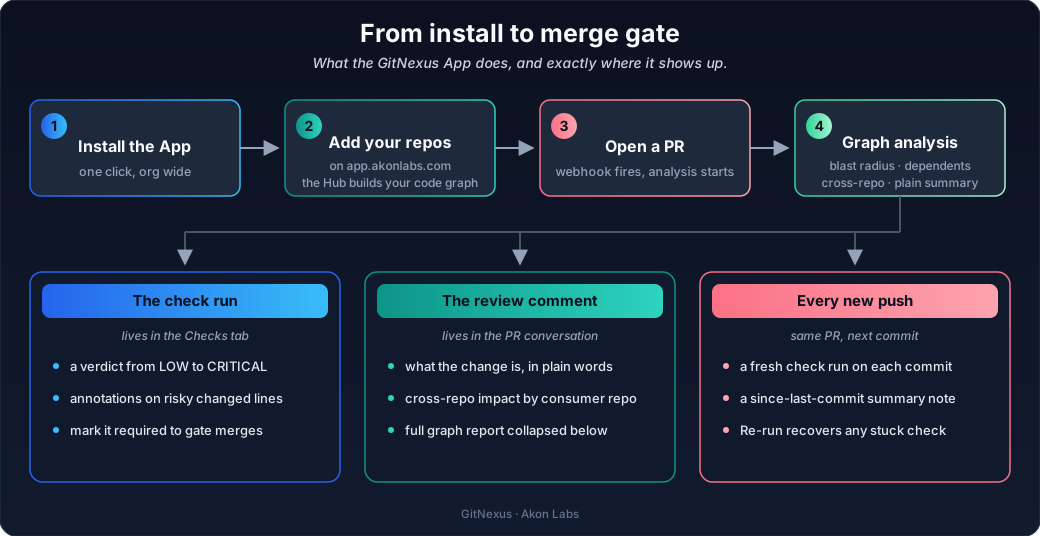
Your code is indexed once and kept fresh. When a PR opens, the App picks up the
webhook, runs the analysis on the Hub, and posts the results back to GitHub. The
review itself takes seconds.
What you get on every PR
Note
Everything below comes from walking a graph of your actual code: real callers, real imports, real contracts. No probabilities, no guesses. The same commit always gets the same verdict.
1. The check run (Checks tab)
A "GitNexus" check appears as soon as analysis starts, and finishes with a verdict:
| Result | Check conclusion | What it means |
|---|---|---|
LOW blast radius |
✅ success | Small, contained change. Merge away. |
MEDIUM blast radius |
⚪ neutral | Worth a look, nothing blocking. |
HIGH / CRITICAL blast radius |
🟠 action required | This change reaches far. Get eyes on it. |
| Breaking contract change | ❌ failure | Something downstream will break. Stop. |
- The summary tells you what the change is and how far it reaches, with the counts to
back it up. - Out-of-diff impact lists the callers your diff doesn't show, so nothing surprises
you after merge. - Risky lines get flagged right in the Files Changed tab. Ranked, capped, never
spammy.
2. The review comment (Conversation tab)
One comment that updates in place as the PR evolves. Never a pile of stale bot
comments.
- Verdict headline: the blast level and what kind of change this is, in one line.
- What changed: every symbol and file, with its status.
- What it affects: modules, callers from direct through transitive, and API
surface changes. - Cross-repo impact: which of your other repos consume this code, and through
what: HTTP routes, imported symbols, messaging topics, contracts. - File risk: migrations, CI, infra, and config files flagged by category.
- The details: a readable digest up top, the full graph report folded underneath.
Sections only show up when they have something to say. A docs-only PR stays quiet.
3. Every push after that
- Each commit gets its own fresh check run.
- A since last commit note covers just what the new push changed, so nobody
re-reads the whole report. - The Re-run button in the Checks tab recovers any check, any time.
Quick start
Important
You need two things: a AkonLabs account here, and an index.
A repo has to be indexed on the Hub before its pull requests can be reviewed. No graph, no review.
| You do | GitNexus does | |
|---|---|---|
| 1 | Create your account at app.akonlabs.com | Sets up the workspace that owns your repos, graphs, and reviews |
| 2 | Install the App on your GitHub org | Links your org to your workspace |
| 3 | Add the repos you want reviewed at app.akonlabs.com | Indexes each one into a knowledge graph: symbols, call chains, dependencies |
| 4 | Open a pull request | The check run and review comment appear, and stay current on every push |
A few things you never have to think about:
- Adding repos later. Add a repo to the installation and it registers and indexes
itself. - PRs opened mid-index. If the repo is still indexing, the check says so. Push a
commit or hit Re-run once it's done. - Keeping the graph fresh. Indexing stays current from the dashboard, and reviews
always run against the latest graph.
Gate your merges
The check run is a real status check, so branch protection just works:
Settings → Branches → Branch protection rules → Require status checks → GitNexus
High-risk changes wait for a human. Clean ones sail through. And since the summary is
posted with the verdict, a blocked merge always comes with an explanation.
Permissions, and why
| Permission | Access | Why |
|---|---|---|
| Checks | Read and write | Post and update the check run |
| Pull requests | Read | See the PR's files and commits |
| Contents | Read | Index the code and analyze the diff |
| Issues | Read and write | Post and update the review comment |
| Metadata | Read | Baseline App requirement |
Webhook events: pull_request, check_run, installation, and
installation_repositories. The App never pushes code, never opens PRs, and never
asks for admin access.
Support
Found a bug or need help? Join the Discord or reach out to us at founders@akonlabs.com
Made by Akon Labs (YC S26)
Developer

Gitnexus-check is provided by a third-party and is governed by separate terms of service, privacy policy, and support documentation.
Report abuse